I’ve been asked about how to store data tables in flash memory using the avr-GCC toolset. I decided to post an answer here. Might be someone who find this useful.
To demonstrate this I have set up a project using the VMLAB simulator. The files you can download from here: Small project using VMLAB simulator
So I created a project in VMLAB. It will help if you read my previous article ho to do this: Using VMLAB as a virtual oscilloscope
In project window I have connected 8 LED’s to port D by typing this:
D1 VDD PD0
D2 VDD PD1
D3 VDD PD2
D4 VDD PD3
D5 VDD PD4
D6 VDD PD5
D7 VDD PD6
D8 VDD PD7
Then I wrote a simple C program:
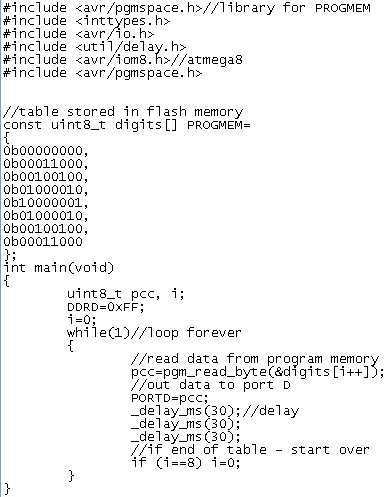
In program you see, that data can be stored in flash memory using data describing sentence:
const uint8_t digits[] PROGMEM={your data};
To make PROGMEM macro work you have to include library pgmspace.h.
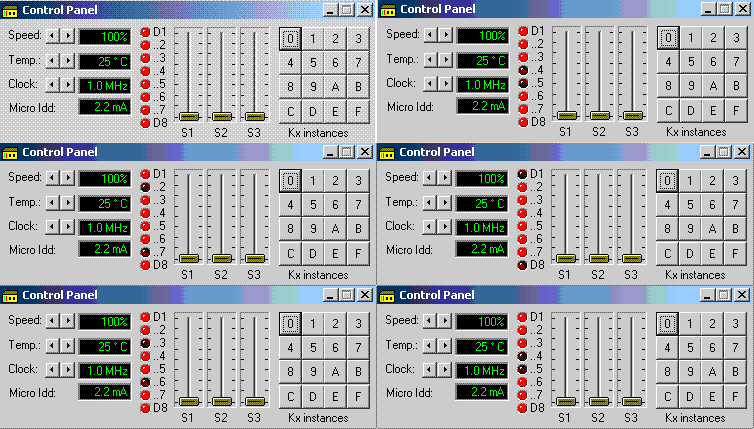
Bellow you see result of simulation in VMLAB environment: