




Properties:
- Interface AVR to standard PC AT keyboard;
- Only two I/O lines were used. One line is also connected to the external interrupt pin of AVR;
- No external components are needed for the interface;
- Included C source reads from keyboard interface and converts to serial
In many situations, you need some human interface for your microcontroller project. In this example is interfacing AVR microcontroller to standard PC AT keyboard described.
Physically interface looks as in picture bellow:
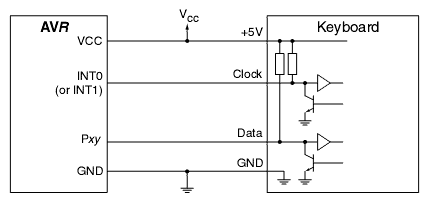
In a keyboard interface, signal lines are an open collector with pull-up resistors.
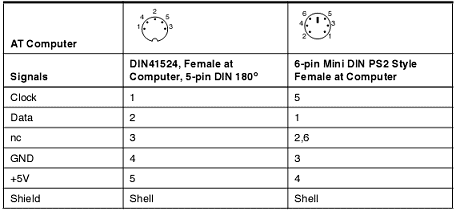
Keyboard cable connectors can be DIN or Mini-DIN (We are not talking about USB interface):
According to the keyboard timing diagram below picture the keyboard transfers data to the host AVR microcontroller. The protocol is one start bit (always 0), eight data bits, one odd parity bit, and a one-stop bit (always 1). The data is validated during the low period of the clock pulse. The keyboard generates the clock signal, and pulses are about 30-50us low and high.

The keyboard has a scan code associated with each key. When the key is pressed – the code is transmitted. If the key is is hold down for a while, the code is transmitted repeatedly (about 10 times per second). After the key is released, the brake code is transmitted ($F0). Usually, all keys have 8-bit length codes, except some keys like Home, Insert, and Delay have an extended code from two to five bytes. The first bytes are always $E0. This is also true for the break sequence, e.g., E0 F0 xx…
The keyboard can handle three sets of scan codes. Default is set Two, which is used in this example.
The code in the example is a simple keyboard to the RS232 interface. Scanned codes are translated to ASCII characters and transmitted by UART. The code included in the example can be adapted to any AVR microcontroller with SRAM.
Note: The linker file(AVR313.xcl) included in the software archive has to be included instead of
The standard linker file. This is done from the included menu under XLINK Options. The linker file applies to AT90S8515 only.
The algorithm is working in that way: Keyboard actions are handled by INT0 interrupt. The algorithm is quite simple: Store the data line’s value at the leading edge of the clock pulse. The clock line is connected to one of the interrupt pins (INT0 or INT1). The interrupt will be executed every clock cycle. And data will be stored at the falling edge. After bits are received, the data is decoded by the decode function, and characters are stored in a buffer. Other special keys (arrows, pagination keys, etc.) are ignored.
The mapping from scan codes to ASCII characters is done by lookup table stored in flash memory.
Read more at: More About project
The source code: Source files
hello.i made a led message board for showing words in a led matrix by avr atmega 32 I want program it without pc only by a keyboard.can you help me please?
thanks.
nader
First of all try to read scan codes from keyboard. when you will have scan codes you can decode them to char’s and perform your tasks according to them.
The scan code reading procedure is same – just copy it. It’s hard to say what experience you have with embedded programming, but changing one AVR to another AVR micro-controller shouldn’t hurt. If there are some particular parts you are concerned about, it would be easier to help.
Thanks for the article!
I want to do precisely this, but with an ARM microcontroller.
Could you describe the hardward modifications needed to interface the keyboard to an ARM7 microcontroller (such as the LPC2119 which is 3.3V, “5V tolerant”)?
Yours,
Murray
(BTW, the comment interface below your article does not work properly with the FIrefox browser — 1.5.0.7. It looks OK, but the “please add” field doesn’t accept input correctly. The input gets referred to the Web page input field.)
I guess Keyboard should be powered through separate 5V regulator. For data lines you may leave as they are because ARM tolerate 5V signals. But to be safer you may use like resistor dividers from incoming signals..
KB—-///———–ARM
…………….1,8k |
……………………/
…………………… 3.3k
……………………/
……………………|
…………………—
About comments…I dont know I work with firefox and didnt notice such problems. Anyway thanks for comment.
hi
i need to know how can i make a serial conection (rs232)between pc & avr atmega16. i must have a program in my o.s.(win xp) that can convert every charecter we typed in a text box to ascii code and send that to atmega16 & micro. convert that to it’s charecter and display that on a lcd(16*2).
pleas help me .thanks
omg, i r total noob. can u pls help me do my projekt? pleas help me.
Seriously though, nice write up. I’m looking to do something similar on my Arduino. This will definitely be a source I’m coming back to. Thanks for taking the time to present this.
Hi how to use this code in ave studio 4, and is it possible to use a usb to ps/2 converter (ie usb keyboard instead ps/2)
thanks
Very good job.Im impressed
I would like to help me connecting my ps2 keyboard in stk500(AVR atmega16 mcu) and make my leds flash when i stroke a key . The board has 8 leds but i think i’ll need 11 to present the 11 bits. Any idea? Or i will make except portD and portB as output? In assembly would be nice. Ihave avr studio to connect with stk500.
Thanks
dear scienceprog..
this is a good article,thank’s a lot.
i’m using AVR ATMEGA8535 for displayed character on dot matrix.
since i try to running C language program that you’ve made. it seems i found error. i cannot find header called ‘pgmspace.h’.where i can find that header?
please help me scienceprog,thank’s for your attention.
Dear Mr. or Mrs..
i have tried this program but i couldn’t compile or make it. An errors said that there’s no pgmspace.h and ina90.h header in this program. And at scancodes header, it said that it needs array.. i don’t know where’s the problems, and i ask you to give me advice to solve this problems..
thank you..
hi! im trying to do the same project but in assembly. If anyone have it done and would like to share it , it would be helpful!
Thanks in advance. Any offer is welcome!
i’d like to use keyboard in messsage display without pc using basic langguage. could you help me?
Hi, i want get data from PC keyborad and Display to 7 segment, you have program asambling?
please help me..
send me at julkadoank@gmail.com
thanks
thanx 4 d article
i need to interface using atmega8l
in assembly language
can u pls send me d coding…….
at abhishek_mtv@yahoo.com
hi, i want to interface the keyboard to my 80C52 microcontroller for my moving message display. please i need a c code to connect the keyboard with microcontroller. plz help… thanx
How to interface USB keyboard to AVR microcontroller???
is there any module or IC that i can use?