




In this article, you’ll find some information about how to configure the GNUARM toolset for compiling ARM7 microcontrollers.
GNUARM is the open-source toolset for ARM7 MCUs. It has a GCC compiler and debugger. Our purpose now is to set up tools in a Windows environment and compile one project.
First of all download the compiled toolset from https://www.gnuarm.com:

Select the newest [GCC-4.0 toolchain] located below Cygwin.
After it is downloaded, start the installation:

- Start window
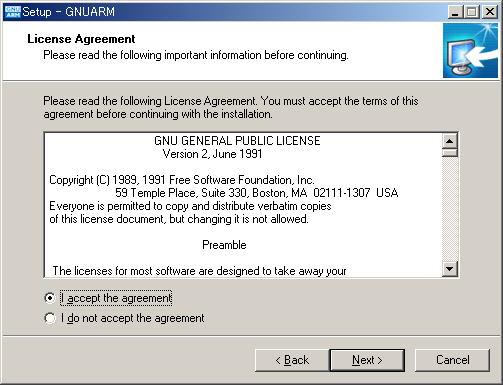
- Accept license agreement.

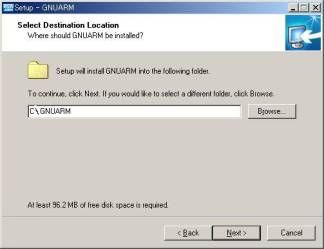
- Select folder where do you want GNUARM to be installed:
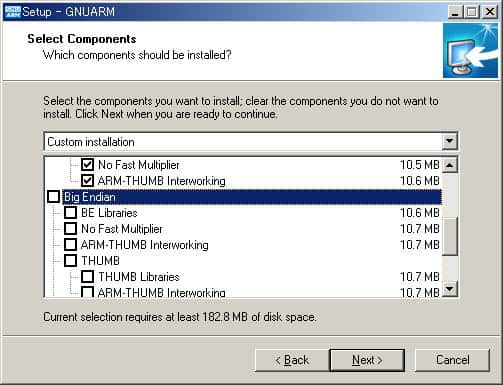
- Select the components. You can select all of them.
- Chose Start menu folder name – just leave as it is.

- Select the desktop shortcut to be placed. I highly recommend checking Cygwin DLL because I had to copy DLLs to copy manually despite I had Cygwin installed. If this option is checked, DLL files will be copied without bothering you.

- And press install..

- Select checkbox in order to create system variable: PATH=c:\gnuarm\bin
After we have GNUARM installed, download Binutils from https://optimize.ath.cx/ARM7/src/utils.zip, download this archive and unpack all contents c:\gnuarm\bin folder. Also, download https://optimize.ath.cx/ARM7/src/cygncurses-8.dll and put it in c:\gnuarm\bin folder. Now we are set to start compilation.
Let’s try the test compilation. Just download the project from https://optimize.ath.cx/ARM7/src/lpc2214_blink.zip and extract it in any folder. Here you’ll find a few files:
| lpc2214.h | LPC2214 header. You can also download from the www.gnuarm.com page where support files are. |
| blink.c | LED blink example program. |
| boot.s | The startup routine first is executed after the resetting CPU. From among these C main function is called. |
| makfile | makefile |
| lpc2214-rom.ld | The load script file in which the linker uses the start address size and the like of ROM/RAM is described. The necessity of the ROM conversion binary is drawn up. |
| setenv.cmd | The configuration file, where you have to show the path to C:\GNUARM\bin and bin C:\GNUARM\bin\utils |
| jtag_flash.exe | The tool, which writes the flash by way of jtag. Writing the hex file, which it appoints, it executes. When ‘N’ is appointed in the 2nd parameter, after the writing in, it does not execute. |
| jtag_stub.exe | The JTAG debugger for GDB/Insight. |
Because setenv.cmd is used to show the path to C: when GCC is installed in different locations, you have to edit it. If you left default settings, then don’t edit this file.
Let’s try to compile this program. Start DOS console window:
Let’s create a hex file. I leave makefile not edited. So I will have to use commands: make and once again make.hex. That’s it hex is done.
Here is a table with the most common make commands:
| Command | Target (function) |
| Make | Compiling & linking and forming the elf file |
| Make clean | The formation file (o lst elf hex bin) it deletes |
| Make hex | Hex (forming the hexa-) file |
| Make bin | Bin (binary) forming the file |
| Make lst | Listing (assembling) formation of file |
| Make run | Compiling & linking and it writes in to the flash, starts the program |
| Make debug | Compiling & linking, and it writes into the flash, starts Insight/GDB. Because it does not start the program automatically, you indicate with the debugger |
If you have a programmer adapter, you can flash your ARM7 microcontroller with only one command – make a run.
Good luck!
You don’t say anything about requiring Cygwin to be installed already.
You don’t need Cygwin to be installed. GnuARM installer has option to add necessary dll’s. And if you have Cygwin installed I recommend to leave this option selected.
Thanks for the directions, which I followed. It wouldn’t make properly so the first thing I had to do was add the path “c:\GNUARM\arm-elf\bin” to the setenv.cmd file so ld, as, etc. could be located. Once that was done I couldn’t get past the “ld: cannot find -lgcc” error. I suspect other environment variables must also be manually set, or files moved, or who knows! It’s probably just me, but everytime I try to set up anything based on GNU in Windows its a battle I usually give up on. It seems that GNU is for real men, not wimps like me!
Nice link for setting up arm toolchain in windows environment. :):)
Karthik Balaguru