




Probably everyone knows Arduino and perhaps using it. This development platform is worth its popularity. Probably the best thing about it is open-source ideology. Indeed it is an excellent development platform that includes software and hardware solutions where even non-electronics guru can master great projects. In a few years, Arduino has grown in a great community around the world. And that is great – this means that you have access to endless resources, endless project ideas and lots of members willing to help if you are stuck with something. All the necessary information you can always find in https://www.arduino.cc/.
OK, enough of talkies. Let’s see what we have here. Thanks to SparkFun electronics, Arduino Duemilanove stands on my table fully assembled and ready to work.

I decided to give a try on Arduino Ethernet shield based on Wiznet W5100 chip. It has a library, so you don’t need to think of details how Ethernet chip is controlled. Few lines and you have some info in your favorite browser.
Of course, if you are using Arduino Pro minimal design, you may also need FTDI Basic Breakout – 5V board.
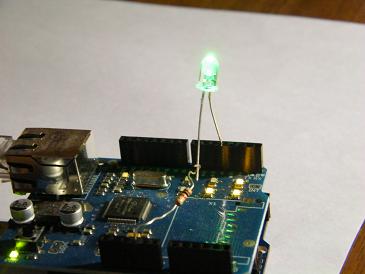
Now let us grab the newest stable Arduino software release from https://arduino.cc/en/Main/Software. And let’s get ready for a simple test. I decided to make a simple LED control to feel client-server and server-client communications to make things more interesting. I hooked led to digital pin 4 while another end to GND via the current limiting resistor. I have connected the Ethernet shield to WRT54G router. As I used standard port 80, there was no need for additional configuration.
#include <Ethernet.h>
While programming you will ideally need one library
You can also use additional like WString.h which I used for fetching data from the HTTP request.
First thing is to assign MAC and IP addresses so the board was accepted to the local network:
byte mac[] = { 0xDE, 0xAD, 0xBE, 0xEF, 0xFE, 0xED }; //physical mac address
byte ip[] = { 192, 168, 1, 110 }; // ip in lan
byte gateway[] = { 192, 168, 1, 1 }; // internet access via router
byte subnet[] = { 255, 255, 255, 0 }; //subnet mask
Wiznet type Ethernet shield doesn’t support dynamic address assign (DHCP)– so you have to do this manually. You may want to check out for DHCP library, which is an early alpha stage.
Printing simple text, drawing tables is a straightforward task as it ends with multiple lines of print functions like
client.println();
With HTML formatted lines inside. The different task is when you need to send some data to the Arduino server itself. One of the standard methods is reading HTTP request by characters. Only when sending address with additional parameters like /?L=1 Arduino can capture this line character by character with line
char c = client.read();
And then analyze it. In your selected way. In this case, it is very convenient to use string functions like append and contains (refer to TextString )
Test result on Firefox browser:

Since last Arduino Ethernet code, several Arduino IDE releases have been released with changes that affected the source code listed in this post earlier. Due to high interest, we updated it with minor modifications to make it work as expected. The biggest problem occurred because Wstring.h library isn’t any longer in use. After all, String.h library is included in the core that brings some difference in its several functions.
In code we need to write
readString += c; instead readString.append(c);
if(readString.indexOf(“L=1”) >0) instead if(readString.contains(“L=1”))
Also, we need to re-import Ethernet.h library to bring along all necessary libraries like Client.h, Server.h, SPI.h, Udp.h.
The other problem occurred when program run was that LED never lights up when the checkbox is selected. I used Serial.print(c); to track down the problem. And it seems that method GET sends two strings:

Our code was catching and analyzing both strings. We only need to take string where the parameter is sent: “GET /?L=1 HTTP/1.1” and skip “GET /favicon.ico HTTP/1.1”. As our example is straightforward, we can see, that second string lacks “?” symbol. So we check the string if there is a ‘?’ symbol, not skip whole analyze.
And the last fix is applied to the LED checkbox. Now it stays checked if LED is ON. I hope you find these changes useful.
Here is a code listing:
#include <SPI.h>
#include <Client.h>
#include <Ethernet.h>
#include <Server.h>
#include <Udp.h>
byte mac[] = { 0xDE, 0xAD, 0xBE, 0xEF, 0xFE, 0xED }; //physical mac address
byte ip[] = { 192, 168, 0, 110 };			// ip in lan
byte gateway[] = { 192, 168, 0, 1 };			// internet access via router
byte subnet[] = { 255, 255, 255, 0 };                   //subnet mask
Server server(80);                                      //server port
byte sampledata=50;            //some sample data - outputs 2 (ascii = 50 DEC)
int ledPin = 4;  // LED pin
char link[]="http://www.scienceprog.com/"; //link data
String readString = String(30); //string for fetching data from address
boolean LEDON = false; //LED status flag
void setup(){
//start Ethernet
  Ethernet.begin(mac, ip, gateway, subnet);
//Set pin 4 to output
  pinMode(ledPin, OUTPUT);
//enable serial datada print
  Serial.begin(9600);
}
void loop(){
// Create a client connection
Client client = server.available();
  if (client) {
    while (client.connected()) {
   if (client.available()) {
    char c = client.read();
     //read char by char HTTP request
    if (readString.length() < 100)
      {
        //store characters to string
        readString += c; //replaces readString.append(c);
      }
        //output chars to serial port
        Serial.print(c);
        //if HTTP request has ended
        if (c == '\n') {
          //dirty skip of "GET /favicon.ico HTTP/1.1"
          if (readString.indexOf("?") <0)
          {
            //skip everything
          }
          else
          //lets check if LED should be lighted
        if(readString.indexOf("L=1") >0)//replaces if(readString.contains("L=1"))
           {
             //led has to be turned ON
             digitalWrite(ledPin, HIGH);    // set the LED on
             LEDON = true;
           }else{
             //led has to be turned OFF
             digitalWrite(ledPin, LOW);    // set the LED OFF
             LEDON = false;
           }
          // now output HTML data starting with standart header
          client.println("HTTP/1.1 200 OK");
          client.println("Content-Type: text/html");
          client.println();
          //set background to yellow
          client.print("<body style=background-color:yellow>");
          //send first heading
          client.println("<font color='red'><h1>HTTP test routines</font></h1>");
          client.println("<hr />");
          client.println("<hr />");
          //output some sample data to browser
          client.println("<font color='blue' size='5'>Sample data: ");
          client.print(sampledata);//lets output some data
          client.println("<br />");//some space between lines
          client.println("<hr />");
          //drawing simple table
          client.println("<font color='green'>Simple table: ");
          client.println("<br />");
          client.println("<table border=1><tr><td>row 1, cell 1</td><td>row 1, cell 2</td></tr>");
          client.println("<tr><td>row 2, cell 1</td><td>row 2, cell 2</td></tr></table>");
          client.println("<br />");
          client.println("<hr />");
          //printing some link
          client.println("<font color='blue' size='5'>Link: ");
          client.print("<a href=");
          client.print(link);
          client.println(">Visit Scienceprog!</a>");
          client.println("<br />");
          client.println("<hr />");
          //controlling led via checkbox
          client.println("<h1>LED control</h1>");
          //address will look like http://192.168.1.110/?L=1 when submited
          if (LEDON)
          client.println("<form method=get name=LED><input type=checkbox name=L value=1 CHECKED>LED<br><input type=submit value=submit></form>");
          else
          client.println("<form method=get name=LED><input type=checkbox name=L value=1>LED<br><input type=submit value=submit></form>");
          client.println("<br />");
          //printing LED status
          client.print("<font size='5'>LED status: ");
          if (LEDON)
              client.println("<font color='green' size='5'>ON");
          else
              client.println("<font color='grey' size='5'>OFF");
          client.println("<hr />");
          client.println("<hr />");
          client.println("</body></html>");
          //clearing string for next read
          readString="";
          //stopping client
          client.stop();
            }
          }
        }
      }
 }
And you can download Arduino sketch ethtest.
Where can I get WString.h?
Nice post!
Its here named string.zip
http://arduino.cc/en/Tutorial/TextString
I,
Thanks for this great tutorial but I dont succed to make it work…
– I download all the necessary library
– I modify the ip and gateway according to my network
– I put one led on the arduino pin 4 as you describe
– I upload ethtest.pde in the arduino
And finaly I put the IP in a mozilla browser but it reply page not found…
Thank you by advance four your help,
PS : Sorry for my Frenchy English…
Are you using any routers?
Look again at:
byte ip[] = { 192, 168, 1, 110 }; // ip in lan
byte gateway[] = { 192, 168, 1, 1 }; // internet access via router
byte subnet[] = { 255, 255, 255, 0 }; //subnet mask
Server server(80); //server port
could be that your router is blocking port 80, so you should use one that isn’t blocked. And of course double check ip and gateway.
Doesn’t work.
when you compile, it says:
error: stray ‘\’ in program In function ‘void loop()’:
And it keeps on saying that.
Looks like a cool code, doe..
Thank’s you Scienceprog,
I dont really understand why but my rooter was blocking port 80, I try another and It’s now working well…
Another question…
I would like to modify the program in order to accept only connections from a list of clients, do you have any idea to make that kind of filter?
Thank’s by advance for your help.
@Lars:
You will get these errors if you copy and paste from this page directly to Arduino window. The single and double quotes are not rendered properly. Edit the file in gedit. Use the replace function to change the “open” and “close quotes” to just plain quotes. Same thing with the apostrophes.
Dan
Is there a way to easily parse the values from the LED status? for example, if you had an RGB led and you could set the color by a drop down box? 1=red, 2=green, 3=blue. Once it’s in a variable it’s easy but It’s not clear on how to parse those values into a variable.
All same – just use dropdown form instead of checkbox. Like:
and then same parsing method with readString.contains(), where you find value like saab.
Hallo
How can I come to that control page.
I can’t open that test page.
thanks
How can I use to controll two servo for a pan tilt system?
Great you show us in detail how to set up a client- server-client on the ARduino shield.
I changed the IP address to 10.0.1.55 and I can ping the arduino shield from my computer but I cannot see anything in my browser. What Arduino sofware release did you use to make it work ? Does is work with release 18 ? I changed Arduino and Ethernet shields but still doesn’t work.
Hi
Thanks for script, the sketch seem to only turn on the led momentary…is this suppose be the case? I was expecting when u tick led it turns on and when you remove the tick it turns off. Advise will be appreciated.
Cheers,
Ken
Thanks for this article.
I had to add the else section for it to work repeatedly or else after chars LED was not switching.
if (readString.length() < 30) {
//store characters to string
readString.append(c);
}else{
readString = readString.substring(1); //push left
readString.append(c);
}
I put the above lines of code into my code and the led is still not staying lit. Has it worked for anyone else or are there any other suggestions.
I wondering if this web-based arduino control work for a wifi arduino project!What do you think ? i can project a website that send de comand to the “server” that send the comand via wifi to arduino project.
I can use it to manage some sensor in the house and my robot project + android phone attached in the robot like a wificam
Hey SciencePrg,
Some insanely nice work there, just the code i needed for a project i’m working on, switching a coffee machine on and off via the internet
Props
Rob.
Very interesting read, thanks.
This is exaclty what I’m looking for, but a few problems.
I use 0021 software, need to import SPI lib but that’s ok. My first problem is at the command readstring.append, got passed this when someone suggested I use concat, now I get an error at “if(readString.contains(“L=1″))”. Class string has no member named contains. Do I need additional lib?
Thanks in advance.
@Johnny,
try this:
if(readString.indexOf(“L=1”)>0)
Hi..I am using arduino diecimila and ATC1000M ethernet module…
I follow your code completely. I uploaded it in my arduino, but when I ping the ip address, it is not found..Please help me..do i still need a PHP?or something else?pls help….
Nice job scienceprog.
I just had to use readstring.substring() somewhere and to add the SPI.h include.
It works fine…very very good.
Thanks
Thanks for the tutorial.
A standard non-bould, non-itallic font and ‘code snippet’ window would have made it easier to read, and hence understand and use.
The google adds could be formatted away from the code too
thanks again though, this really helped me!
Why error (‘class String’ has no member named ‘append’) in line readString.append(c); ¿?…
good work.
The proble is the WString.h library, it’s no longer in use, You can use String.h included in Arduino core, you can see an little explanation in my blog.
http://wp.me/p1hTQs-L
In spanish you can translate with google, If any doubt I would try to help you.
I get the problem that
if(readString.contains(\L=1\))
errot:’class String’ has no member named ‘contains’ how to solve this?
if you do
if(readString.indexOf(“L=1?)>0)
then it has more errors
thx
hi i ‘m completely new to arduino but i have worked with atmega 640
i am interested in similar kind of project so please can you help me with the hardware requirements and detailed description if possible
please help
Hi well you need the arduino uno for the outputs en inputs. Just type in in youtube and you get tons of information of it. And you will need to use the arduino ethernet shield to make connection via ethernet with your board. You also can see much information when you type that in on google.
hope it helps.
Found the solutions for both things now.
for the readstring.append(c) do this
readString +=(c);
and for the other one
if(readString.contains(\L=1\))
do this
if(readString.indexOf(“L=1”)>=0){
and then it will work 😀
Hi ScienceProg
Grettings from Colombia
I´ve been studying your project, also i had read all the comments posted, but i can´t get it works, i use your code even i corrected the problems about the library, i get the ?L=1 on the address bar but the if condition doesn´t turn on the LED.
I wonder your help or somebody who it works can help me.
I use Arduino UNO and ethernet shield WIZ5100
By the way, very nice webpage.
Regards,
JAVIER RICARDO ORDOÑEZ ANAYA
I’m running version 0022
I adjusted the code to get it to work, except for one thing: The LED is NOT controlled by the check box anymore. As soon as I visit the webpage for it, it just lights up and stays on.
Any ideas? I can post my code (if you tell me how to show it in this text box).
Thanks!
Cheeser,, but you can get the LED turn ON, You used the Wstring Library and the changes in the indexOf and all that.. I can help you to turn OFF , i use arduino 022 too.
Updated code according to changes in Arduino IDE. Also several minor bugs fixed.
Below is the link to my program. I want to control 3 leds via my webpage. I have successfully created the html layout and the web address is also changing but the problem is that while I switch ON one LED the other two gets turned OFF (which I dont want). I want is that the previously ON pins should remain as they are.
Please help me..
http://pastebin.com/7B2tUNbZ
Probably you should skip analyzing “GET /favicon.ico HTTP/1.1” string as in updated example.
Thanks for the great work.Under Mac os everything works well but if i uncheck led and submit under windows7(IE9 and mozilla firefox)the led stays checked again
@scienceprog
its just the same with that. since, the link is getting changed and our program is checking it, so this doesnt work for multiple LEDs.
What about we introduce the ON-OFF feature for each of the 3 LEDs? Please suggest the suitable coding also.
http://pastebin.com/Q2Btiz3Y
Here is the program developed by me.
I have creater separate ON and OFF checkboxes for the 3 LEDs and one submit button.
But the problem is that:
Suppose I ON all the 3 LEDs in the first instance. And if I have to turn OFF only one LED after that I will have to select ON for the other LEDs as well, which I dont want. I want is that I will be able to turn OFF an LED by selecting that particular LED and clicking on submit.
How can I proceed with that? Please guide me
Hello,
when I try the webserver example from arduino sw version 22, and send a request with a standard webbrowser, there is no reply.
I found the problem, but got no confirmation of the missbehavoiur so far.
Please see my posting here:
http://arduino.cc/forum/index.php/topic,57972.0.html
Please tell me how can I go online with this program. I mean it works fine in LAN but how can I control it via Internet?
In this project is arduino acting like web server or client or both. Cuz not only its uploading html page requests (serving) but also receiving info of whether LED is on or off (client)
Am i right?
Hi,
This has been a very valuable resource for my senior design project that I have worked on all semester and I will be documenting and giving you credit accordingly ;-). It gave me a great start to learn how to build a web interface using the ethernet field.
However, the page “hangs” and doesn’t load when I plug it up to an actual relay. Every loads fine when the relay is not plugged in. I am using the KTA-223 “relayduino” (http://www.sparkfun.com/products/9526) to control light bulbs via the same concept. Any help would be great.
Hi,
I am using Ubuntu 10.10 and Chromium 11.xx and it works with a LED in Dpin4. I can only light on in Firefox 3.6.17 .
One of my friends tried from an Android Phone and it worked for him too. But not in IE? and FF?
Can someone explain to me, if set readString=”?”; then my Firefox works and my Chromium don’t, and if I set readString=””; then my Chromium works and not FF.
Chromium:(readString=””) LED off – monitor returned:
GET /? HTTP/1.1
GET /favicon.ico HTTP/1.1
led ON:
GET /?L=1 HTTP/1.1
GET /favicon.ico HTTP/1.1
Firefox:(readString=”?”) LED off – monitor returned:
GET / HTTP/1.1
led ON:
GET /?L=1 HTTP/1.1
byte mac[] = { 0xDE, 0xAD, 0xBE, 0xEF, 0xFE, 0xED }; //physical mac address
byte ip[] = { 192, 168, 1, 110 }; // ip in lan
byte gateway[] = { 192, 168, 1, 1 }; // internet access via router
byte subnet[] = { 255, 255, 255, 0 }; //subnet mask
byte mac: is the number on the sticker on the thernet shield??
byte ip: is my ip address which i can find on my laptop?
byte gateway and byte subnet.. i still didt understand what they are?
if please anyone can help me
@polidano – you don’t have to worry about the mac address. it is some random value that was assigned. it’s not really important to change. the ip address is also a random value YOU SET so that you can access the contents on the arduino from your web browser. that is the only thing you really may need to change if the software built-in to your router already uses the 192.168.1.1 address. hope that helps.
Thank you a lot scienceprog!!
Excuse me for my bad english
Greetings from Colombia too 😛
I’ve just made a slight modification and used a second button to make the LED turn off in a quirky way, because the LED does not turn off with FF4 using Mac OSX and lubuntu 11.04 with the main example you provided…
I’m just a beginner, I also apologize because I don’t know how to elaborate a code tag here, so just made this change:
if (LEDON == true) {
client.println(“LED”);
client.println(“LED”);
client.println(“”); }
else if (LEDON == false) {
client.println(“LED”);
client.println(“LED”);
client.println(“”); }
It’s not perfect, sometimes the checkbox doesn’t work the other way around, and if you use more than one networked computer, and don’t let the server a little time to process the request, the page is shown in a weird way. When one user pushes the LED button on, and some other user wants to put that LED off he/she has to push the submit button twice…
The example code is simple and understandable to tinker with, thanks a lot.
dammit, beginner’s trap 😛 I’ll try again:
if (LEDON == true) {
client.println(” LED “);
client.println(” LED “);
client.println(“”); }
else if (LEDON == false) {
client.println(” LED “);
client.println(” LED “);
client.println(“”); }
if this does not work, I’ll try to know how to post a code window here and stop bothering you:P
regards.
hello, i am having a problem here using the code.. when i verify the code it says that server class has been renamed. Can I use these codes without a router? Is it possible PC –> arduino + ethernet shield? Im new into this. pls help . thank you very much.
Wiznet W5100 may be a good chip but the price difference between a shield based on it and a shield based on ENC28J60 chip with SPI interface is very significant, even more so considering that MCU-based hobby projects tend to be on a very tight budget. In fact, by far the lowest cost Ethernet implementation for an Arduino would be to use not a shield but a separate controller board with 0.1″ pin headers which is still very easy to hook up to the Arduino but even easier to position conveniently in the project box. Besides, not being bogged down by the Arduino shield’s weird PCB shape that requires routing, I’ve seen eBay sellers from faraway East places drop the price down to $8-$12 for standalone ENC28J60-based Ethernet controllers. If you can wait 3-4 weeks for it to arrive from China, this is the way to go.
hi everybody,
i need to use two different forms in a single html page and both should have a 6 checkboxes how can i acheive it.
i tried this but ended up with lot unknown errors