




USBASP is a well-known USB programmer for Atmel AVR microcontrollers initially supported by Thomas Fischl. USBasp flash uploader is made of an Atmega8 or Atmega88 and few other components, including resistors, capacitors, LEDs, and connectors.
The adapter works on a firmware driver, which gives room for customization, and new chips updates.
The USBasp programmer has been so famous for a long time. It has been supported by avrdude – an open-source programming software, which runs on multiple platforms like Windows, Linux, or Mac. Since Arduino’s popularity has skyrocketed, the need for such tools has diminished, and so the support has been stopped. I can assure you that USBasp still works and there is no problem running it on Windows 10.
USBasp circuit diagram
Let us see what is this adapter is made of and how to set it up to run on Windows 10.
You can find the original circuit on the author’s site: http://www.fischl.de/usbasp/. There you will also find several third-party PCB examples to choose from.
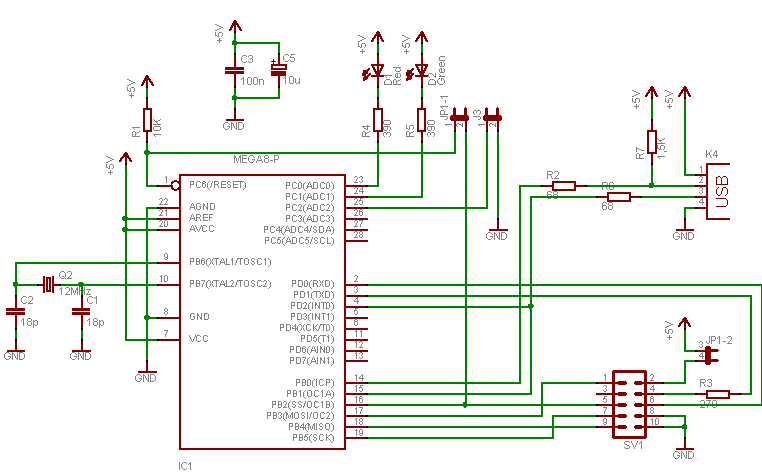
The USBasp adapter is an Atmega8 (or Atmega88) microcontroller clocked with a 12MHz crystal. The assembled PCB is ready to be connected via a simple USB B-type cable (PC side needs A type of connector). If you decide to build a new board, I strongly recommend making it a micro USB, as USB-B has almost vanished.
- Resistors R2 and R6 are current limiting resistors that protect the PC or hub USB port.
- R7 helps the computer to recognize a USBasp device as LS (Low Speed).
- Diodes D1 and D2 indicate data transfer.
The ISP connector for USBasp
Header SV1 is compatible with STK200/300. Just 4 and 6 pins are used for RXD and TXD that may be used for other purposes).
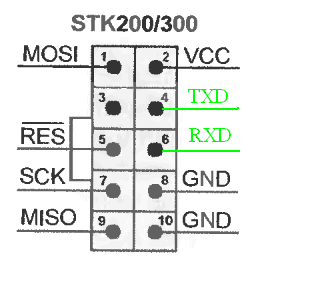
You can use an adapter from 10 pin header to 6 pin ISP header, which is more common in many AVR boards such as Arduino.
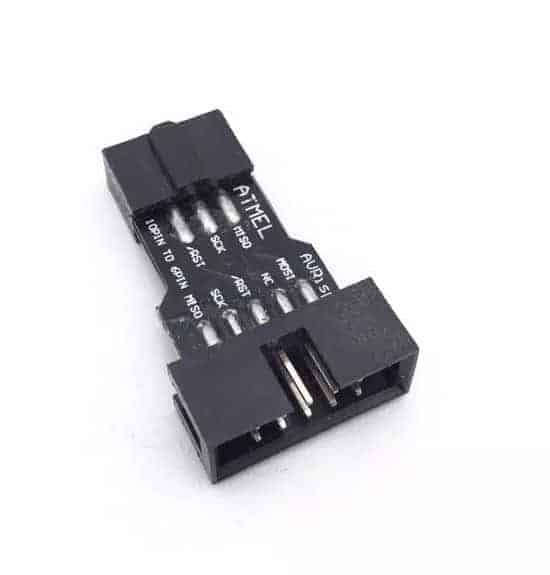
Another option is to select wires and solder directly to 6-pin header.
USBasp adapter jumper settings
SCK signal can work at two selectable frequencies, 1.5MHz and 8MHz, selected with a Jumper JP3. If Jumper is unconnected, then SCK speed is 8MHz. Low-speed SCK is only required when MCU is clocked with a low-speed oscillator like 32kHz.
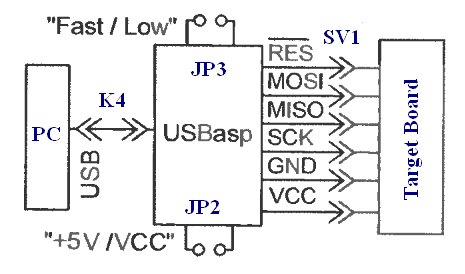
Jumper JP1 is used for programming the USBasp adapter via ISP. Moreover, the last Jumper JP2 is used for powering the adapter from the USB port (not recommended).
Assembled USBasp adapter:
Downloading a firmware for USBasp
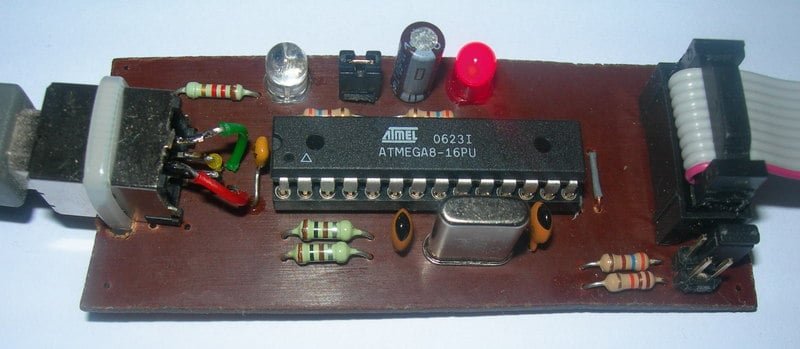
To make this adapter work, you need to program Atmega8 with the latest firmware, which can be downloaded from http://www.fischl.de/usbasp/ page (usbasp.2011-05-28.tar.gz (519 kB)). The last updated version is dated 28 May 2011. If you want to program the chips that were manufactured later, you will probably fail. Keep in mind that USBasp will only work with chips up to date.
Installing Windows 10 drivers for USBasp
Setting up a USBasp adapter in Windows 10 system may be a bit trickier because the included Windows drivers will not work – they even will not install. Luckily there is a great workaround to make it work. All you need is to download a USB installation tool – Zadig. It will establish a libusb-win32 driver that works just fine in Windows 10.
Before installing drivers, be sure to upload firmware first, then connect the USB cable to the adapter and PC.
- Connect cable directly to the USB port of computer avoiding Hubs (it may work with a hub, so be aware);
- Then start Zadig program that you downloaded and select libusb-win32 as in image below:

After a successful setup, you should see the following view in device list:
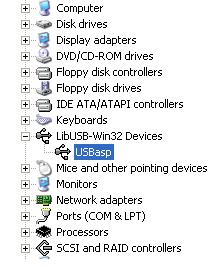
When the device is
unplugged – the device disappears from the device list.
Testing USBasp with avrdude
Arduino software also has an avrdude inside. Unzip the folder and navigate to it through the command-line tool.
Connect USBasp programmer to the board you want to program. You can use an Arduino board with ISP connector:
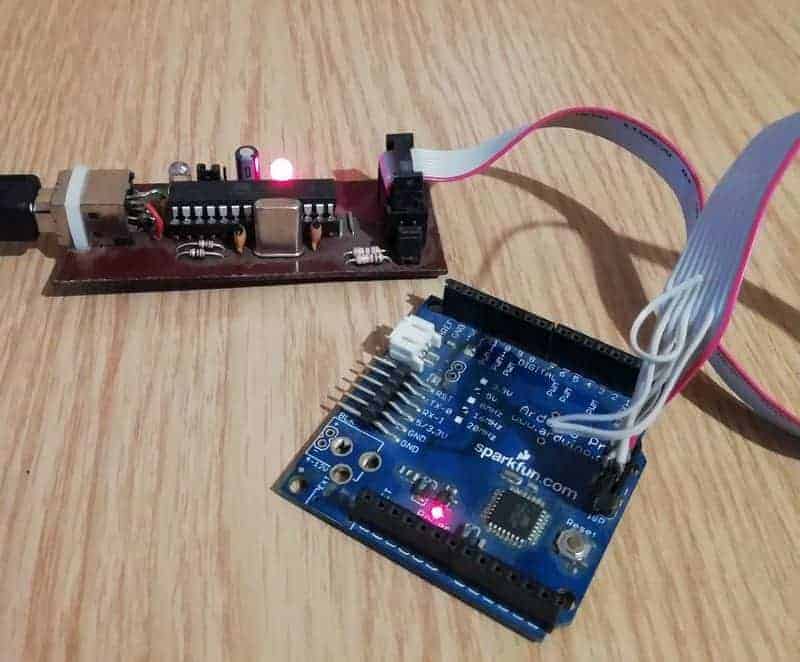
We can read a flash memory of atmega328p by executing the command:
avrdude -p m328p -P usb -c USBasp -U flash:r:flash.hex:r

Here is a list of quick commands to test with USBasp and avrdude:
Check device:
avrdude -p m328p -P usb -c USBasp
Read flash contents to .bin file:
avrdude -p m328p -P usb -c USBasp -U flash:r:flash.bin:r
Read flash contents to .hex file:
avrdude -p m328p -P usb -c USBasp -U flash:r:flash.hex:r
Write .bin file to microcontroller flash memory:
avrdude -p m328p -P usb -c USBasp -U flash:w:flash.bin
Write .hex file to microcontroller flash memory:
avrdude -p m328p -P usb -c USBasp -U flash:w:flash.hex
Read eeprom memory to .hex file:
avrdude -p m328p -P usb -c USBasp -U eeprom:r:eeprom.hex:i
Write eeprom .hex file to microocntroller eeprom memory:
avrdude -p m328p -P usb -c USBasp -U eeprom:w:eeprom.hex:i
Fuses write ( Visit fuse calculator to select proper fuse settings. ):
!!!Do not write fuses if you do not know what you are doing!
avrdude -p m328p -P usb -c USBasp -U -U lfuse:w:<0xFF>:m
avrdude -p m328p -P usb -c USBasp -U -U hfuse:w:<0xDA>:m
avrdude -p m328p -P usb -c USBasp -U efuse:w:<0xFD>:m
Excellent solution for quick ISP programming with laptops! thanks very much..
help me.i make a USBasp from Thomas Fischl pages. but it dont work.WinXP dont recognize device.Win2000 show Unknow Device.who can help me???
try to connect it through a USB hub it may solve you problem i don’t know why
I believe description of SCK frequencies is wrong. USBasp indeed has 2 programming frequencies – high when jumper disconnected and low when connected. These frequencies are 375kHz and 8kHz, however. In order to use 375kHz speed, target MCU’s clock frequency has to be at least 1.5MHz (SCK * 4, same rule for low speed).
Thank you M.C. for this notice. That was big mistake in description. Now it is corrected.
This article is quite interesting and well explained. But I am a newbie, I want to build this programmer. It will be my first ever. But i was quite surprised/confused when i read the following: “To make this adapter work you need to program Atmega8 with driver firmware”.
How do i program the atmega8? I want to build this circuit to be able to program amtmega’s. If i have to build another programmer then what’s the point?
i bought atmega 8L by mistake instead of atmega8.
Is there a way out to construct the ubasp mentioned above eith atmega 18L? (since they cannot be clocked to 16MHz)
delson you need to make a small bsd programmer for it.
its easy you need to plug in some wires in ur parallel port and connect them to ur atmega8
ok but how do i upload the firmware in ATmega 8??
I tried this schematics and didn’t work. my atm8 crashed atfer firmware update 🙁
I had a solution for usb (i have a laptop too.. only USBs). My card is suporting programmer, communication and power suply. 🙂
Sorry to ask the naiive question:
(1) how do i unpack the tar files from fischl’s website? command line and switches please.
(2) Can anyone please explain how to load the ATM8 with the firmware, can it be done from WINDOWS…?
I’m new to this and would greatly appreciate the help.
thanks. -isaac
Hy,
1)I simply use Total Commander unpack feature. But tar files are supported bu WinRAR program – so there should be no problem to extract simply by clicking right mouse button.
2)It depends on what programmer you use… if it is simple COM or LPT ISP programmer you can use PonyProg software.
Hi,
When i try to unzip (with winzip) i get “error reading header after processing 0 entries”. could there be a problem?
I downloaded winRAR and was able to untar. Please ignore my winzip question. Thanks for the help and pointers
I built this programmer using atmega 8, and this microcontroller was programmed using my AVR Dragon; I’v installed driver, and I’ve checked all connections, but when I try to program a microcontroller with USBASP allways says the same error about “signature bytes” sometimes it reads 0 and F. I’am using slow clock, I don’t know why I can be able to program the microcontroller, Can any body tell what coulb be wrong? Thanks
Hello,
This article is useful and well explained !
I made this project and I installed this on my PC .
Now I need a little help in bascom-AVR software . I do not know which programmer should I select in Bascom-AVR software ( option >> programmer )
Please find this picture :
[IMG]http://i32.tinypic.com/21l7s3n.jpg[/IMG]
Please tell me and help me to solve this problem .
Thank You,
Sajjad
Hello,
I have a problem on my laptop: Windows does not detect the programmer (unknown USB peripheral). On the other hand, the programmer well work on my desktop computer… What does it occur ?
Thank You,
Thank you for the article. Well put.
I have a few questions:
1. Are the jumpers necessary? Can they be over riden with open/shorts according to required settings?
2. The USB device will be detected even without a target board?
Thank You
Hello,
i have a problem with programming atmega8. I use paralel programmer with uisp software. Firmware hex file programming ok, but i dont know values of fuse bits. Somebody can send me the fusebits values?
Thank you
Hello,
I have sucessfully made it but encountered a strange phenomenon. I can 100% re-program all chips on hand but could not program any new chips (just bought). Avrdude says “Such chip could not be initialized or recognized”. I could only get it programmed once with other programmer then I can use it with this programmer.
Thanks a lot for your help!
@omiya Lee
I have also same problem. I brought Usbasp from market which can be used program new chips. But the usbasp i made at home can’t program any new chips, it can only program the chips that are once programed. Have you found the solution?
@Omiya Lee,
Adding an external crystal (Try 3MHz to 8 MHz) may solve your problem. You need to have external crystal there. I think the program sets fuse bits without giving any indication to the user.
Hi,
I have made this programmer, but now i have a poblem. On my “desktop” PC programmer work ok (USBasp is detected). On my laptop (with the same drivers) i get message “Unknown device”.
Any ideas?
Thanks
Hi,
I have a new facts. I was tested the programer in 2 other PC’s (desktop and laptop) and it works fine.
I think the problem is my Windows.
Hi,
problem was solved with adition two zener diodes (3V6) parallelly to data wires (+/- D).
By the way, for programming a “low speed” AVR (mega8 with using internal 1MHz oscilator) you must short the SCK jumper.
That’s all. Sorry for my english ;).
hi,i see not recognized device on my laptop,but on my desktop it works perfect.
Hi,
I have made the circuit as said and inserted in the USB port of my PC. The PC detects it but coudn`t able to install the Device driver properly.
What can I do? Please suggest me in this regards.
i have a USBasp programer with atmega8
can i use this programer to program a atmega8 micro-controller.
Hello Every One
I have recently written a GUI Software for driving USBasp compatible USB Programmers. It is much easier to use than the avrdude or avrdude-gui.
You can download it free of cost from here
http://extremeelectronics.co.in/avr-tutorials/gui-software-for-usbasp-based-usb-avr-programmers/
i burn hfuse and lfuse in Atmega8 as HFUSE=0xc9 LFUSE=0xef. now it is not working with usbasp can one tell me the solution…
Hi Rakesh i can solve your problem for not working of atmega8 because by adjusting the fuse bits you have switched off the spi enable pin of the controller therefore the usbasp is not working
Know you have to reburn the fuse bits by using a universal programmer and switch on the spien bit then it will start recognizing the device.
Try it…
Hi..
Ketan can you tell me about universal programmer.
and how to use it.
Thanks
@Rakesh
You have just enabled external crystal oscillator. Just put a crystal (say 12MHz) on XTAL1 and XTAL2 along with 2 22pf capacitor(to GND) and it will start responding again !
🙂
please check this
http://dhost.info/bdrelectronics/Tools.html
New HW for the USBasp able to program target device with VCC down to 3v.
the Resistors on the output of the programmer and the protecting diodes
in the target device limit the voltage to the VCC of the target
and for the input to the programmer, the ATmega8 in the circuit see
the voltage from 3 to 5V as a logic high
in the pc using the usb 1.0 laptop while using usb 2.0, can be overcome by using a usb hub
I use usbasp to program AVR in windows. But now I want to use it in Linux (UBUNTU) . I know Avrdude can work with usbasp but avrdude cant find usbasp. Should I install a driver for usbasp in Ubuntu? If yes, How can I download and install it?
A suggestion: I put an alternate power source for the USBasp using 7805 and a 9V battery. I have a switch to select USB power or battery power. My laptop (dell inspiron 1525 recognizez USBasp only when battery powered.
Dear Sir:
Could you be so kindly to inform me about the configutations bit for ATMega 48 and ATMega8, my programmer ask me for them (To be able to program the CHIP with firmware)
ATMega8 ATMega48
RSTDISBL
WDTON
SPIEN
CKOPT
EESAVE
BOOTSZ1
BOOTSZ0
BOOTRST
BODLEVEL
BODEN
SUT1
SUT0
CKSEL3
CKSEL2
CKSEL1
CKSEL0
Thanks
Hey all.
Could you be so kindly to inform me about the configutations bit for ATMega 48 and ATMega8, my programmer ask me for them (To be able to program the CHIP with firmware)
ATMega8 ATMega48
RSTDISBL
WDTON
SPIEN
CKOPT
EESAVE
BOOTSZ1
BOOTSZ0
BOOTRST
BODLEVEL
BODEN
SUT1
SUT0
CKSEL3
CKSEL2
CKSEL1
CKSEL0
Please, i’m having same problem…not knowing which config bits to program. Please be so kind to help with some info on that matter.
Thanx
OK, never mind…LOL. I got it to work!!!!! The config bits in Ponyprog should be set to the following…. TICKED(selected) : CKOPT, BOOTSZ1, BOOTSZ0, BODEN, SUT0. The rest must be left “unticked” Hope this helps you “ARMAGON”
Is it possible to program the avr MCU to enable xtal oscillator when you are using pony prog with the target MCU not using the XTAL oscillator
What should be the value of the fuse bits value to be loaded into the firmware for USBASP.
Can any one please help me with the simple PCB desin for USBASP those in homepage are quite harsh and cannot be made at home.
Hi,
this article is very interesting for me but im a newbie too..can someone tell me how to program this usb asp using CodeVision AVR??
thanks before..
what is JP1, JP2, JP3
to Sera:
JP means jumper or simply a “switch”
if you connect the JP1, it means you’re supplying target board with 5V voltage from USB
JP2 must be connected IF you want to update the atmega8’s firmware. and JP3 is connected if you want to slow down the programming speed (i don’t know exactly why the speed should be slowed down)
to Richard and other guys who still have problems with usbasp fuse bits settings:
just try to program the firmware with avrdude (you should install winAVR, i suggest the 2009 version)
to program the firmware:
Use parallel port/STK200 programmer to flash your atmega8 in another circuit (breadboard or PCB is OK)
open the command prompt, move to the folder where you put the firmware from Thomas Fischl’s website, and type:
“avrdude -c stk200 -p atmega8 -P lpt1 -U flash:w:main.hex -U hfuse:w:0xC9:m lfuse:w:0xEF:m”
it’s automatically flash the firmware and set the fuse bits.After this, just move the atmega8 to your usbasp circuit, and see what happens when you connect it in your PC/laptop. I’ve tried this and i’m so happy to see the result…
🙂
hi all… just build usbasp and so far windows never detect my usbasp, hundred time i try , reprogramming, reconfigure the fuse, still didn’t work…windows wont detect it, i checks nothing wrong in connections , i cant found dioda zener 3.6V here, is that could be my only problem..?? do i have to add dioda to both D+ D- parallel ??
Did you try on different PC?
Yups… i plug it on my Acer travelmate 3000 nothing detect on usb, then i plug it on my desktop computer; detected but system said \usb device malfunction\, unknow usb divice, system don’t ask driver.
Thanks for your response please help me, sorry my english not clear, i am from indonesia.
@dodi:
yes, you have to add the 3,6V zener to the D+ and D-, it’s important for adapting the voltage level of the USB system.
The first time i try, i have the same problem with u too. But there’s nothing wrong in my circuit. I’ve added the 3,6V zener. And i asked help to Sajid Muhaimin’s website :
http://sajiduc.blogspot.com/2009/02/my-usb-programmer-is-working-in-vista.html
And he said i have to program the fusebit (hfuse and lfuse) to be 0xc9 and 0xef. And i made it.
why my comp not detected new hardware?
hi wibi… now i add 3.6 zener to the D= and D- , but system still not recognice it “usb device malfunction “… how can i program the Hfuse and lFuse on ponyprog…??
-dodi-
Open the Command menu and select “Security and Configuration bits”. There are some checkbox in it but i found no place to write hexadecimal code for the hfuse (0xc9) and lfuse (0xef). So I suggest you to use avrdude or progisp cz it’s easier to write the fusebit settings.
if you have avrdude installed, open the command prompt, go to the folder where you put the “main.hex” file and just type
“avrdude -c stk200 -p atmega8 -P lpt1 -U flash:w:main.hex -U hfuse:w:0xC9:m lfuse:w:0xEF:m”
(if you use the parallel port programmer)
sorry i forgot about this.
put “-U” just before “lfuse:w:0xEF:m”
if you can’t download the file, remove the “/progisp166.rar”on the link above, and search the progisp166.rar in the page
OK wibi , my usbasp now detected the problem is on xtal, i use xtal with 14 MHz…. heheh it make serius problem, it make baud rate to usb not corect.
After i replacing the xtal with 12Mhz USBASP detected but when i programming the target chip the problem now is cannot communicate with target chip…any suggest..??
Hi i build my 1st programmer ie USB AVR ISP…..
As discussed above the same problem programmer is not detecting…..What can i do pls explain me clearly….. and also abt H fuse & I fuse……..
I have made an atmega32 board, i have used 8 Mhz external crystal. I am using ponyprog to burn the code. I have also set the frequency in ponyprog as 8 Mhz, but it gives me slow output. I checked, if I wrote codefor it to wait for 1 sec, it waits for approx 10 secs. Please help me out with it.
hey guys. i just built that usbasb programmer and now my laptop with its 32x vista cant recognize it and prompt me this device malfunctions…. im pretty sure that used 2 3.6v zener diods. and q is 12mhz. i tried it on desktop with xp. but its still Not working. can you help me to make it fixed?
Hi.
I have atmega16.dose this programmer works for atmega16?
I’m amateur.please help me!
man and van this was great and i think it doea work
Hi Friends,
Just i construct this programmer. Successfully the firmware was uploaded to atmega8. MY desktop also detects as LIBUSB.
The Problem is How to write a program in another Atmega8 by using this programmer. I found error avrdude.exe: error: no usb support. please compile again with libusb installed.
Please can any one help me !!!!
i am total beginner in this. How do you upload the firmware to ATmega8??
can i use atmega8L to build this USBASP-USB programmer?
can i use atmega8L instead of atmega8 to build this USBASP-USB programmer?
Hi everybody, sorry for waiting…i’ve tried to answer ur question lately,but my comment couldn’t appear in here at that time…
@Dodi:
Make sure u connect the VCC, GND, MISO, MOSI, SCK, and RESET pin from ur usbasp ISP port to the same pin at the target chip (see the chip’s datasheet…). also for some situation, u have to place a 12MHz XTAL between target chip’s XTAL1 and XTAL2 pin (see the datasheet…again..)
@Bala:
Maybe the problem is in the hfuse and lfuse configuration,btw what software u use for programming ur uC? if you have injected the .hex file to ur atmega8, just look for the fusebits settings in ur software, set the hfuse to be 0xC9 and lfuse to be 0xEF. That’s a hexadecimal number that represents the state of 8 settings of hfuse and lfuse respectively.
@Mb:
Try to use 11.0592 MHz XTAL instead of 8 MHz..the XTAL frequency can affect all delay/processing time in the program.
@shervaan:
maybe u have the same problem with Bala, have u set the fusebits like i said above to Bala?
@MOMO:
Do you mean using usbasp to program atmega16?
off course it can, i’ve tested it to communicate with atmega8,16,32,8535, and even 8051 microcontrollers! check the end of my comment…
If you mean you want to use atmega16 instead of atmega8 as the main chip in the usbasp, i don’t think it will be work. Usbasp needs atmega8 or atmega48 as the main chip.
@Zainul:
Try to download and install WinAVR 2009 and also install the avrdude which available in one package with the WinAVR. And download the newest version of usbasp package from http://www.fischl.de/usbasp/usbasp.2009-02-28.tar.gz
btw, when the first time u plugged usbasp to ur PC, does ur windows detects new hardware and ask for driver?
@AJ:
since atmega8L has several difference with typical atmega8 i.e.: atmega8L clock is only from 0-8 MHz, i don’t think atmega8L can be used, because usbasp needs 12 MHz XTAL, which is not suitable for atmega8L
FOR ALL:
i suggest to use PROGISP software for programming ur target chip using usbasp .It’s user friendly and easy to use…
check it out:
http://www.8051projects.info/blogs/file.axd?file=2009%2f10%2fprogisp168.zip
You can also make ur usbasp able to program 8051 microcontrollers (AT89S51/52/53) too..!
Cool, isn’t it?
just erase the older firmware inside ur atnega8 and inject the firmware (main.hex file) you’ve downloaded from this link:
http://www.8051projects.info/blogs/file.axd?file=2009%2f10%2fusb51.zip
Hi this USB Port Supported AVR Microcontroller Programmer available here in India check here http://onlinetps.com/shop/index.php?main_page=product_info&cPath=65&products_id=753
Get the complete code and circuit for programming 8051 micros with USBASP from here
http://www.8051projects.info/blogs/post/USB-8051AVR-programmer.aspx
Usb programer support CodeVision AVR,
you can view n my blog, but my blog with indonesian language, you can use google translate,..
<Usb Programer
sir I just wanted to know if the 68 ohm resistors can vary within certain limits.
I shall be very thankful if you could explain it to me.
im a total begener
i wuold like to have some doubts cleared
1. what is a make file ???
2. what are the files do be burned on the flash of the atemga8 ???
Hello to all!!!
Does USBASP support XMega series programming?
Thanks in advance
Best Regards
Ioannis
hello every body….!
i am totally a bigener
can i use atmega8a instead of atmega8 to built usbasp-usb program
I shall be very thankful if you could explain it to me.
Hi Mahesh,
Yes instead of atmega8a you can use atmega8 for usbasp.
& mehrdad for programming Atmega8 for USB sap you can use simple AVR serial programmer.
or another AVR programmer which support ATMEGA8.
for any query contact me any time bvishalof@gmail.com
dear! I ‘m a bit confused about burning firmware to atmega8 for building uabasp programmer. tell me whether i m right or not. first we have to bootload the new atmega8 for uploading firmware because new atmega8 chip without bootloader not recognised by avrdude.exe am i right?
hey
i got problem after installing my hardware and now i dont know how to program my Atmega8 on circuit it self..
if some one know i ll be grateful to share it with me ..
Hi all,
I am trying to make USBasp since last 2 month but its not working. Its showing “Unknown device”. I have no issues regarding board and soldering. Everything I got from http://www.fischl.de/usbasp/, downloaded “usbasp.2011-05-28”, but its not working. Please help me regarding this issue. I am really got pissed off now.
i have built my usbasp and windows recognized it but icant read any device
i have another usbasp(i bought it) and it read these devices
what is the problem
dear sir please send me micro controller USB based burner programming and circuit diagram on my e mail . i am waiting your reply thanks. and if you what any help about schematic and PCB layout routing than contact me on this Email : pcbdesigns@hotmail.com
thank you very much, but is there any support for 24Cxx IC and 25Xxx …. please help us to build a support IC 24Cxx and 25Xxx … thank you.
V USB in USBasp very nice
Should the USBasp be connected to the microcontroller for the microcontrolle to do its task… I am facing this problem please help me
My USBASP to PC connection was OK but my chip still couldn’t detected by software (bascom AVR)…
when I used parallel cable it was nothing problems… Please help me sir… thank you before…
It looks very complicated to me but i think it does work if you follow the guide.
my laptop(having windows 8.1)shows notification of non recognised malfunctioned device connected to system on connection of microcontroller kit(ATMEGA 16).I UNABLE to connect.