




After unsuccessful attempts to run a few programs which drive peripherals like USART and Timers on Atmega128, I decided to make a JTAG debugger. I hope it will allow me to see what is happening may atmega128 corrupted, or something is wrong with the software or hardware.

The most widely used AVR JTAGICE clone is AVR miniICE, which is compatible with the original AVR JTAGICE. AVR JTAG is mainly used for target board debugging in the real world. And of course, you also can program your AVR’s with it.
To build this board is very ease as its schematic is simple:
List of materials you will need:
Amount-Type-Title
- 2-470R-R1, R2
- 1-10K-R3
- 2-22p-C7, C8
- 6-100n-C1,C2,C3,C4,C5,C6
- 1-LED-G-D1
- 1-LED-R-D2
- 1-ATmega16L-DD1
- 1-MAX3232-DD2
- 1-7.3728 MHz-Q1
All secret in its firmware, but don’t worry – it is ready to go.
AVR MiniICE has the following properties:
- Is compatible with AVR JTAG ICE;
- It is capable of debugging and programming Atmega microcontrollers with JTAG interface;
- Real-time debugging support;
- Regular updates of firmware to support new types of AVR;
- Upgrades can be done directly from AVR Studio;
- Power supply from 2.6 to 6V;
- Connects to AVR Studio through COM port;
- Two LED indicators (Power and Connect).
Now AVR studio 4 supports following AVR MCU’s (maybe already new ones included):
- ATmega128, ATmega128L, AT90CAN128
- ATmega16, ATmega16L
- ATmega162, ATmega162L, ATmega162V
- ATmega165, ATmega165V
- ATmega169, ATmega169L, ATmega169V
- ATmega32, ATmega32L
- ATmega323, ATmega323L
- ATmega64, ATmega64L
How to set up this adapter to be ready. The main thing is that you have to upload the firmware to it. For this, you will need an ISP programmer. First of all, you will need to upload a Bootloader (or Alternative bootloader )to Atmega16 to be able to update the firmware to the newest one located in the AVR Studio directory.
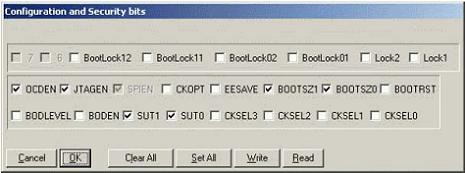
When the bootloader is programmed program fuses like this (Using PonyProg):

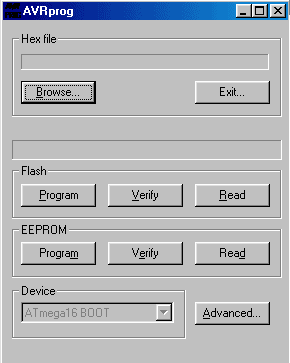
Then connect AVR miniIce cable to the PC COM port and start AVR Studio. In the AVR Studio Tools menu, locate AVR Prog. And browse for file upgrade.ebn in AVR Studio directory (by default in “C:\Program Files\Atmel\AVR Tools\JTAGICE\Upgrade.ebn“):
After AVR is programmed (usually you will get some error message – don’t pay attention to it), you can program AVR fuses to its previous state – to disable bootloader:
This is it. You have done it. If you did it correctly, it should work. Here is my prototyping view:

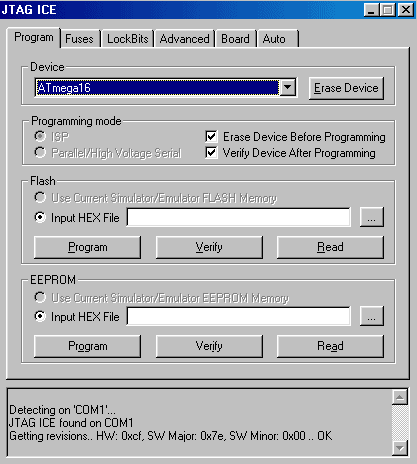
As I mentioned, AVR MiniICE can be used as an AVR programmer as well. Goto Tools->Program AVR. Then select AVR programmer JTAG ICE and desired COM port. After this you will be directed to the JTAG ICE dialog window where you can program your target AVR:
How to start debugging will be in following articles.
Download Another AVRICE project with SCH and PCB files as images.
I’m wondering why they used a Mega16, and not a smaller one like a Mega8…
Is there a way to get the source code ?
I guess this is because firmware is too big for atmega8. The code is provided is bootloader which for loading the main firmware and it is bigger than 8kb.
For bootloader you can find many code examples, but JTAGICE firmware is ATMEL’s property and it only provides compiled file needed to update the firmware for atmega16.
Ok. I understand this stuff right now.
Many thanks for your great job ! 😉
Hi all,
is there any link where I can download better images of schematic?
You’re talking about next article on how to use it. Was it already published? Where?
Thanks a lot.
One of Jtag variants with many pcb formats you can download here:
avr_jtag.zip
I am going to write article about how to use AVRJtag step by step. I am just waiting for my development board to be finished as my previous had some failure.
Hi all,
I’ve made the circuit, then I’ve programmed my ATmega16 following the instructions above, but the JTAG hasn’t worked. I’ve wondered I’ve made some mistake while setting fuses so I’ve tried to repeat all the procedure but neither PonyProg nor a professional programmer (DataIO) has recognized the chip. Can you give some hint how to recover the chip or I have to give it a decorous burial?
Where is the critical step in the procedure? I’d like to avoid killing another micro….
cheers, Luigi.
I think the only thing you might done incorrectly was fuses. If you did like in screenshots your Atmega16 at least had to be recognised by ponyprog. While working with AVRPRog be sure to uncheck BOOTSTR fuse – it is only needed when you upgrade Jtag (Atmega16) firmware.
Of course there is probability that Atmega16 just have died. You can try to repair fuses by attaching external clock source.
For me above steps have worked well, jus I hadn’t chance to test Jtag on target board but setting Atmega16 jtag and updating firmware went without problems.
I want to repace the RS232 with a USB cable ,what kind of changes are necessary, i want to build one use USB rather than serial,bcoz my computer doesnt have a serial25
i want to try this tools, but the schematic is to small, i can not read it .. i need a bigger schematic ..
tanks.
I have updated JATAG schematic. Now it is in PDF format and you can zoom it to any size.
Tanks for the new schematic in pdf format. I ask again.., can i replace ATmega16L-DD1 with ATMega16 or ATMega8535\ATMega8515, replace MAX3232-DD2 with MAX232, replace 7.3728 MHz-Q1 with 4 Mhz or 6.6864 Mhz or 8 MHz .., because i can not find that components .
Tanks
i see the size of boot.hex = 41 KB, but the flash size of M16 = 16 KB, so .. is it enough ??
tks
Do not look too much at the hex file size. It is always bigger than it is burned to Flash. In hex file is more additional information which is not burned to flash.
And yes you can interchange ATmega16L-DD1 with ATMega16 as they are same microcontrollers just supply voltages differ. Again MAX3232-DD2 and MAX232 they are pretty same, just MAX3232 is used in 3.3V systems. If you power Atmega16L with 3.3V, then use MAX3232, if you will use ATmega16 and 5V supply then use MAX232 or you have to comply the voltages with additional circuitry. I don’t think that you can use Atmega8535 instead of Atmega16 and Crystal like 4Mhz without changing and rebuilding boot file. You can find this JTAG clone built on Atmega163 if you need.
I am still waiting for my Atmega128 dev board to be finished that I could give a try to this JTAG clone.
Firstly i try my M16 usart communication to my pc. i try, make small tester serial program in c language , observe the transmit data from M16 on the hyper terminal.., and the results is M16 usart and pc comm port is not communicate (data is not displayed in hyper terminal). For comparison, when i using the same MAX232 with the same circuit in smaller avr like at90s2313, attiny2313, at90s4433 there is no problem on communication between uart and pc comm port. Why my m16 usart can not connect to pc comm port ??, and i think my m16 is not dead, because i try the ADC and display the result in LCD (i use bascom avr) and that is run (no problem).
Please help me ..
Tanks ..
Don’t be sure that your Atmega16 UART is OK. I had similar problem with Atmega128 Only ports were working properly but not other peripherals.
hi,
if i use 11.0592 MHz crystal then, do i have to change any thing on th hex file. if possible can u send the source code for the boot loader.
Koushik
hi,
i am waiting for your reply,
Thanks,
Koushik
Hy,
Sorry for delay…
You have to match the freq , as the Jtag program downloaded into the M16, is the Original Atmel binary , that expects a 7.3728 (or close to that)
Some guy replaced the original 7.3728 Mhz by 7.345Mhz and worked nicely as – 280Hz difference did not change the baud rate for the UART.
If you need you can use like a 14.746 Oscillator (TTL output) , and a flip-flop to divide the freq by 2.
Anyway why would you change crystal?
There are many versions of boot-loaders and I don’t really need a source code as there are ready to burn hex files. I have found one source file written in basic language. If you need I can share with you.
Hi,
Thanks for your reply but can u tell me one thing i got 7.2MHz xtal, so can i use it. And pls share the basic code with me at least i can now some thing about it.
Thanks,
Koushik
7.3728-7.2=is about 1728kHz. I wouldn’t dare to predict the behaviour. You can try and let me know.
It doesn’t seems to be a problem to get 7.3728MHz crystal as they are widely used.
P.S. Basic file sent 😉
hi,
thanks for your help, i’ll check the code and reply asap.
thanks,
koushik
Hi
I have build MiniIce as above. After programming the ATmega16 the AVR-Studio gives me this message: “The OCD JTAG adapter was detected but the target device did not return a valid JTAG ID. Please check the points below…ect”
I have checked the points below and it seems to me OK.
One more thing, when I was programming the ‘upgrade.ebn’ in “AVRprog” window in “Device” I had “ATmega163” but I couldn’t change it.
Thanks for any help.
Bye Jan
I want to tell Mr. ScienceProg that I have been successfully built this mini JTAGICE (i am using Mega 16).
Thanks very much for your great idea and job.
Thank you very much.
regards
nyoms
Hi
I found where was my problem. After I connected to JTAG MiniIce some ATmega, it appeared that the JTAG device is working correctly.
Thanks to Mr. ScienceProg.
Bye
What’s the difference between the 2 bootloaders provided on this site?
They are pretty thesame, just from different sources. Iam using Bootloader
Thanks.
I’ve used atmega16l, 7.3728 crystal and followed the above steps. But when I connect miniIce to COM port and select AVR Prog in AVR studio 4, it said that ” No supported board found, AVR Prog version 1.40″. Could you give me some hints ?
I guess you forgot to set JTAGEN fuze on target MCU. Seems JTAG adapter is working.
No, I did. Even I’ve tried two IC, and I’ve tried twice times each IC. I haven’t used PonyProg but I’ve set the fuse exactly. After not success, I have select “ICE50 Upgrade” in menu Tools, it said that it can’t find ICE, then it begin looking for bootloader, and finalny it can’t find bootloader. Have you ever met the same problem?
I’d met the same problem.I updated one time, but trying again AVRstudio message “No supported board found, AVR Prog version 1.40″. Fortunately, jtag works well. How can I update again?
Hi Mr blackEagle ! I don’t understand what you said. You’ve met the same problem, then you tried other times and got the JTAG work. Is it right? And now what do you want to update?
“No supported board found, AVR Prog version 1.40″ message means that Jtag adapter is OK and it tries to communicate to target board. so I would look for problems there. Might be wrong connector or some error in target board.
But its hard to say why ICE upgrade cant find bootloader. I would look for hardware mistakes first (is crystal 7.3728 Mhz, is there PCB OK, is COM OK, is Connector OK), then I would check if the AVR Studio is with newest update, and again I would check the fuses. As I didn’t face that problem I can only guess.
I use 7.3728MHz Crystal, and I made the circuit on plastic board. The crytal is connected between pin 12 and 13. Two 22p capacitors connect those pins to GND(pin 11). Also have 10k+10u for Reset, 0.1u between pin 31 and GND. Pins 30, 32, 38, 10 are conneted to Vcc (5V). And there are for 10u for max232,…. When I selected “AVR Prog”, I saw that there some signal on RXD of AVR, but there is nothing on TXD. I have checked the fuses, but there is no wrong. I use AVR Studio 4.12. I have done the same for all my three AVRs, but the results are the same.
Hi Mr.Scienceprog ! My board has operated OK. That was my mistake, I have forgotten the resistor between Pin17 and GND. Thank you very much for you idea !
I think you should load the flash after you update using “AVR Prog”, so shorten the steps of making JTAGICE
datk45d, glad you made it.
– I didnt understand what do you mean by “load after update”…
Great article, I just used to program a ATmega16 and all ok. Now I will try to start debugging with it.
my target board uses Atmega8 which seems doesn’t support JTAG port at all, right ?
so I think I don’t need jtagice programmer …
No Atmega8 doesn’t have JTAG port.
Is possible to replace mega16 by mega168?
With this firmware and AVRStudio upgrades – not.
Is possible to replace mega16 by mega162?
Is possible to replace mega16 by mega162?
No these devices aren’t compatible.
Can I change max232 to FTDI232??? I saw one LED, what LED is show??
I don’t know if debugging software would treat virtual RS232 port normally. Cant say for now.
LED in circuit indicates JTAG activity.
Can I programme mega16 by Byte-Blaster with AVReal?
And I have clone JTAGICE but placed FTDI instead MAX, and it was worked any times, and now refuse… what do me???
Hey nice work scienceprog!! I haven’t yet made it, but its a great idea.
To hell with the $500 Atmel programmer!!!
I am trying to upgrade the firmware through avrprog, and when avrprog is loaded the device is set to atmega163 instead of atmega16 BOOT. What can i do?
I cant say exactly for now, but once I had such situation. Maybe you have burnt atmega163 bootloader instead of atmega16. Or there is something wrong with detection with your adapter.
i burnt this bootloader : https://scienceprog.com/wp-content/uploads/2006/11/boot.zip
what adapter are you referring to?
when i tried the other bootloader , this error popped up “No supported board found, AVR Prog version 1.40″.
AVR JTAG ICE clone working. I still got the Atmega163 instead of atmega16 BOOT.
Thanks.
Hi,
I found your PDF file was defferent from the SCH files
as images.What is more,the original SCH seem to
used as a JTAG ICE tool and JTAG programmer.
On#13 ,MAX3232 is used in 3.3V systems,but it is also
used in 5v systems refered to Maxim’s datasheet. If you
use ATmega128,I suggest MAX3232 is used.
Hi, i suppose its possible to replace the ATmega16 with a ATmega32?
And what does the bootloader do? As i understand it, once the bootloader is in place, my circuit is like an empty JTAG ICE ready to recieve firmware update through rs232? I get the “No supported board found, AVR Prog version 1.40″ message”, when selecting AVRProg from the tools menu, I have no other MCU connected to the JTAG (target debug IDC10) which may be the problem, but I was thinking that after the bootloader is installed (using AVRISP mkII), next step would be to update firmware (which shouldnt need anything connected to “IDC10”?. Also datk45d mentioned selecting ICE50 upgrade from the tools menu? is this correct?
when i try to load the bootloader in to mega16, it comes with an error message “write failed” after it write. it that something wrong here? or just the way it is???
Dear Sir,
I make a litte test program(Led Blink) and then i download to my ATMega128 using this JTAG-ICE. I have been success download this program to the Mega128 status message: micro is detected, programming success, and verify also success), but the micro is not work. But when I debug the Mega128 using this JTAG in AVRStudio, the micro is work (led can blink). So, what is the problem (in debug mode->micro is work.., but when download success->micro is not work) ?? May be I wrong arrange the Mega128 settings when I download ??
Please help me.
Thanks.
Dear Sir,
Where is your article about how to use AVRJtag step by step (specially about JTAG as programmer and target is Mega128) ??
Thanks.
I hope you read this article as there I put some steps on working with Jtag Clone.
Working with Jtag clone
This is strange behavior. After entering debugging mode stop debugger and remove JTAG cable. Restart circuit. Is it working. Seems like there are problems with programming mode. FYI: when debugging program is also uploaded to flash and remains here.
Dear Sir,
1. After removing JTAG cable, the Mega128 circuit is still not working. Would you like show me the Mega128 fuse setting when you download a program (Led hex) to the Mega128 ??
2. In my JTAG menu ,in first tab (General tab) ,I see the Programming Mode combo is blank (why ??), so i am not select anything in this combo. Do you think this condition is the cause of the problem ?
3. On your article “Working with Jtag clone ” I see there is no boot hex in the zip file. Are there differences boot hex in that article againts boot hex on this article (Build your own AVR JTAG ICE clone, bread board version) ?
Thanks.
Hy nyomansad,
3. Yes yo uare right i didn’t put boot.hex in package – now I did.
Other questions I wil answer as soon as I get to my board. Probably it is better to shift this discussion to forum Forum
as I will need to post some pictures and it is easier to track messages.
Hi there,
I am impressed by your AVR JTAG DIY programmer.
I would like to build one, however I only have MEGA32’s at hand. I’m sure that the MEGA32 can be used as a substitute, since it has larger memory space etc.
I am aware of differences between the MEGA32 and MEGA16, however I am having some trouble getting the JTAG software recognised, I have gotten the Bootloader working however.
Would it be possible for you to download your an Intel HEX file off the working JTAG programmer and email me a copy? It would greatly help and I am close to getting it working on the ATMEGA32. I can get the EBN file uploaded, and I have edited it accordingly in an attempt to get it working.
However to do this, I needed to use a disassembler to get it back into ASM code. At this stage there are some ‘broken’ links and some strange commands that I would like to compare with a working program.
(Since the interrupt vectors and boot memory for the 16 are different to the 32, it would help if I could work off a ‘working’ copy)
Regards,
Adrian
hi scienceprog,
i wanted to kno if the miniICE u hav developed above is compatible with the Atmel JtagICE mkII used for the at90usb series. i’m working with an at90usb1287 and am lookin for a jtag circuit for the same. please help!!!
rgds,
Sangeet
No this adapter won’t work with JtagICE mkII.
Hi ScienceProg,
Really a nice engineering work. I am trying to use mega32 instead of mega16 will it be a problem and also In India, in my local town i am really finding hard to get that crystal, so my question is if i change the bootloader source code according to crystal i select, will the AVR ICE work?
~SwK
Hi
Science program
This really good work building the JTAG ICE Debugger. I am using Win AVR for compiling codes it will generate. coff (make Extcoff)files and loading in AVR Studio (Version 4.12) and I am able connect to target board with help of JTAG ICE . Once I will start run or debugging the program the debugging pointer will show’s in Dissembler window. I am not able to debug in C source code window.
At present it showing Hardware version 0xC2, Software version 0x7F. Please help me how can I set up for debugging with C source code
Thanks
Muralidhara
Thanks, It works!
Hi,
This JTAG clone works with the atmega16L target as I tested. However, It can not find the target if connecting to the atmega128L.
Do you have any experience on this (eg., firmware update)?
Thanks
It worked for me check out https://scienceprog.com/avrjtag-clone-in-action/
Can i replace 7.3728MHz crystal with 8 crystal in your AVR_JTAGICE schematic?
No you cant do this because this will lead to adapter communication errors with computer.
First of all,thank your reply. If i replace 7.3728MHz crystal with 8 crystal in your AVR_JTAGICE schematic ,will it affect USART and will it affct my simution ?I have used your schematic ang boot.hex ,but jtag_ice can not link to com1. can you give me a boot.hex which comptile with your schematic?
why do not your schematic compatile wiht your boot.hex? Can you give me a boot.hex?
Hi, the problem is my atmega128 board, not your jtag clone. Now, it works!
tuanpa,do you use boot.hex or alternatine boot.hex ? when you input your boot.hex into mega16 ,is the led is lignt?
Hello
Very interesting information! Thanks!
G’night
hi Wang Yanchun, I use boot.zip in the article. I didnt notice that the led light or not.
My current Jtag-clone using prototype board. I’m working on the PCB for the new one. When completing and programming the boot.hex. I will notice and tell you if the led light.
Thanks a lot
hi tuanpa,is it necessary for comptileing the fuse of the mega16 in the aim board ?
Who can help me?
hi ,tuanpa,can you tell me your QQ to me?My QQ is 154293949.
2 Wang Yanchun:
I just follow the arcle step by step and it works.
2 scienceprog:
I got some Atmega1280. Do you know any clone circuit that can program the device?
hi there ,
can you tell me if i can program an arm32 chip’s with this jtag ice clone or can you give me one that can do it other than the wiggler i have an avrisp mk2 already but the price of a jtagice is unbelievable help me please
cheers
david
0K!my jtag ice have worked!
sorry,I have not haved any clone circuit that can program the device.
Sorry about that.
Anyway, i was rambeling about my finds on this programmer.
I am trying to build it and i, like many, fail on the avrprog issue.”No supported board found”
I get this error even when i have no programmer connected to my system.
Inorder to build it, i have loaned a mkII. Therefor i wonder if i MUST use ISP-programming, or if JTAG is ok.
If it is ok, would it be possible to add the correct fuse settings screenshot from avrstudio aswell?
I am also confused about the schema and BOM. The dont match compleatly, if im not misstaken. I only see one LED in the shema, but there are two in the BOM. Also the names and values of the capacitors and resistors dont appear to match.
Apart from that, everything seems great. When I get this to work, i can add a mechanical outline for a veloboard/stripboard that fits nicely in a cheap plastic box. looks almost professional 🙂
// Martin
Adapter from this thread
https://scienceprog.com/avrjtag-clone-in-action/
should work without problem. At least it worked until I somehow damaged it.
Martin, about which circuit are you talking as there you may find few of them.
Hi again scienceprog.
From the top of this page( https://scienceprog.com/build-your-own-avr-jtagice-clone/)
i find a link ( https://scienceprog.com/wp-content/uploads/2006/11/jtag.pdf)
Just below that link i find the BOM.
Should i use a diffrent schematic?
// Martin
I was building this:
avr_jtag_clone.zip
from https://scienceprog.com/avrjtag-clone-in-action/
The circuit you pointed served as reference, but it also sould work.
I am starting to get the feeling that i must have done something seriously wrong i my layout.
I will redo it on a breadboard.
Darn it
// Martin
It is perhaps a good idea to mention that the COMport used by AVRprog will only be COM1 to COM4. No other comports will be probed.
// Martin
i want to say to scienceprog
i have made the circuit and it is worked well:)
and i would like to thank him very mush
Hello, I am trying to recover an atmega16 that is ‘bricked’ because I set the fuses wrong.
Will this programmer be able to program it if the jtagen fuse is disabled because of a mistake?
Please clarify this because I will have to built a parallel programmer instead in order to save the unit.
Thanks.
Hi Guys,
I have made a USB version of this JTAG clone, if intrested please post a request. i will send you the link. and the complete hex files + ckt.
Thanks to scienceprog for his contribution.
~SwK
Hy SwK, Of course we are interested. Feel free to post link here. It would be nice to write short review here on how to build and run it. If you are interested, use contact form: https://scienceprog.com/contact-form/
hi, sienceprog does this JTAG suport debuging wire in ATtiny 2313 ?
debugWire in tiny2313 is totaly different from JTAG. this device cannot be used for dW.
you gonna need Dragon or orig. JTAG mkII
my attiny 2313 ‘stuck’ in debuging wire mode and i
I just want to reeneable ISP . and i have no debuger just ISP programer and a max232 RS232 to TTL level konverter. please help…
to disable dw you need
– AVR Dragon or JTAGICE mkII to connect via dw line and disable it
or
– parallel programmer, to disable dw fuse
or you can get new avr 🙂
is there any firmware for atmega32 version? so pity I don’t have any atmega16 while have a lot atmega32s
where i can find the firmware for JTAG ice clone? i was searching this page but i cant see any link to download the firmware. Do i need to register or something?
Hi sir
Thank you your great article, i made this JTAG long time ago, but recently, i upgrade the avr studio tp 4.14. the JTAG device only can program through the jtag port, so i decide to upgrade the firmware as well. After I try many times, i decide to reload the bootloader and start from the beginning.
problems c0me after i program the M16L. I can open the AVRprog and get the upgrade.ebn, but it comes with a error message “..file doesnt fit into flash” when i try to program the flash.
I never seen this before and it seens nobody has this kind of experience. Anyway, the chip is good, because i got the same result with different M16.
Its not listed, so I think I know the answer, but is there any reason why this wouldn’t work for debugging Atmel’s AVR32 processors?
Hi, a few months ago I wrote a comment in the other link: https://scienceprog.com/avrjtag-clone-in-action/, but i got no answer. I will try again here.
Well, I made the PCB. I loaded one bootloader(the one that is placed in the forum), connected the jtag_clone to my target board, set the fuses to the target board, set the fuses to the MCU from the Jtag adapter. And nothing happened. I tried all COM ports(1 – 4). Still nothing. I use MAX232N with 1mF capacitators. On the oscilloscope I saw some communication between my PC and the Jtag_board. All connection are checked, all fuses too.
Still AVR_studio(4.12 is the version I have) says “No supported board found. AVRprog version 1.40″.
I also tried ICEupgrade but this is what I get.
Please, give me a hand. Hi, a few months ago I wrote a comment in the other link: https://scienceprog.com/avrjtag-clone-in-action/, but i got no answer. I will try again here.
Well, I made the PCB. I loaded one bootloader(the one that is placed in the forum), connected the jtag_clone to my target board, set the fuses to the target board, set the fuses to the MCU from the Jtag adapter. And nothing happened. I tried all COM ports(1 – 4). Still nothing. I use MAX232N with 1mF capacitators. On the oscilloscope I saw some communication between my PC and the Jtag_board. All connection are checked, all fuses too.
Still AVR_studio(4.12 is the version I have) says “No supported board found. AVRprog version 1.40″.
I also tried ICEupgrade but this is what I get.
Please, give me a hand.
Project not sucessfull. Having a lot of doubts about the bootloader and the fuse bit config. whether the scheme is correct? in this article.
Sorry guys for slow response. It is really hard to tell the problem right now. It can be a mistake on PCB, or some problem with wiring. Did you use exact 7.3728MHz crystal? Many people have built this adapter and it is working properly.
Yes, I use 7,3728MHz crystal. I found many other similar projects in the net, and I tried to make them as well. Always one and the same problem: “No supported board found”. It seems that there is no communication between the PC and the JTAG. For some time I have doubts in if my comport is OK. Although I have used it for communication between the PC and a MCU and it is working fine. It is very strange indeed…
As I understand you cant upload firmware with bootloader? Sometimes people forget that setting up a JTAG adapter is two stage work. First of all you need to flash a boot.hex in to ATmega16 enable bootlaoder with fuse and then download firmware. After its done you need to uncheck bootloader fuze and then you can use adapter.
…
If your port is working properly double check your PCB maybe ther are some bridges between tracks. I really can tell more than you know. The only thing Iknow – It sould work 🙂
I really love to have some strong rapport with Scienceprog as consider you are one of my Best teacher.
In this project i have used the exact procedures that you have instructed though i got a negative result as similar to Nedsan.
Help required in this regard.
The Bootloader seems to work with some simulating software and AVR studio is also responding but becomes silent in the hardware. I think there is some trick to be revealed.
If I program the microcontroller with stk500 and avrstudio which are the fuse bits in avr studio?
I answer myself. You can calculate the fuse bits from pictures above, checked means 0 and unchecked 1. I also want to say which was my mistakes during construction. If you can’t get it work try to remove crystals load capasitors or calculate the capasitor values again. I removed them and got it work. It’s also possible that you can’t program the bootloader with usb to serial adapter, try real com port.
I always read these common problems everywhere, e.g. fusebit, freeISP programmer, make or buy etc.
I tried to answer them at http://www.deccanrobots.com and deccanrobots.blogspot.com
Hi Scienceprog, thanks for a great article.
Did you ever get the USB version from SwK?
I’d be very interested in seeing it!
Thanks!
Hi!
I’m a little confused. In the part list there are 6 100n(C1-C6) adn 2 22p(C7-C8) capacitor, but on the schematic i can see only C1,C2,C3 and E1-E5(?).What sare the capacitor values?
Thanks.
Dear, I collect the Crystal 7.3728MHz and design the circuit from your design and using STK500 for downloading program and burning fuses. I can upgrade successfully and (have some error) I ignoreed the error. But cant connect the devce [select AVR programmer JTAG ICE and desired COM port.]
PLease, help me on this… some tell me to my email the code to program the atmega16 that is in the device… I dont know how… or another one to tell me how to build another programer that is able to be used with the avrstudio..
please, help.
my email is hercules.daniel@gmail.com
Hi,
I need to reprogram my ATMEGA8515-16PU chips clock source to an 8MHz crystal, I was wondering if it is possible to program the chip using a usb to ttl interface, im very new to all this so sorry if this seems a stupid question, its just it looks kind of a similar idea to the serial devices ive seen except the signals it provides are TX, RX, CTX, RTS, DTR, DSR and DCD. Here is a link to the what I have: http://cgi.ebay.co.uk/ws/eBayISAPI.dll?ViewItem&item=310122268633
Hi
It is great you offer the very useful things.
But I made it according to this,it doesn’t work.
I want to know why.
Hi,
are the listed materials still correct?
In the schematic are 5 capacitors named E1-E5 and they look like electrolytic capacitors and in the material list are only C1-C8 listed.
So what capacity do they all exactly have?
Is this clone still upgradable from AVRStudio?
AVRStudio seems to looks for a serial number now.
Thanks for your information,
My programmer work most of time very good ,but when AVR studio need to use external reset to connect to target board , it seems external reset (Pin 1 in Atmega16)doesn’t work. Do you have any advice for me? Meanwhile my target board is ATMEGA128 .
This design is a copy of design from a site which I cooperate with: http://www.aquaticus.info (currently heavily modified) and there it comes from my website (www.m2uu.com, search “JTAG”). At the stage it was copied there were some errors in the design (which are now corrected) – JTAG fuse bit, some minor mistake in schematics (problem with measurement of target voltage).
I wouldn’t like to sound rude but if one plans to copy something there’s nothing wrong in asking the author for permission, or at least place a link to the source.
To all,
I’m facing the same problem like jan and others said “Atmega 163” problem & can’t detect the hardware.I’v checked the connections,the board & etc but until now failed to make it work.Any help?.
Anybody sucessfully did the avr jtag ice with usb? can send the files to me? I would like to build one. Thanks!!
Hi Lukasz I had previously found your website
http://aquaticus.info/jtag
I have linked from my website to your page.
I built one a year or so ago with the buggy voltage check will have to go back and fix that.
for those that can’t get the 163 to work have a look
here http://www.atmel.com/dyn/products/tools_card.asp?tool_id=2737
hello author,
sir i make a jtag progrmmer and its ok in the first attemp by putting the hex file available on this site the communication is ok and i programme atmega 32 and mega16 but there is some problem
1:
as i know it is an emulatoar also but when i wana debug the code by start debugging and by pressing the step into or f11 button on the key board the code is stepping into in the avr studio but the controller is normally operating and the code contrle is not transfer to the avr studio or i can say jatag emulator.
2:
the second thing is that its capable of isp progammming also by connecting the jumper on pb0 to the ground but when i connet the jtag programmer/debugger in the avr studio it is all the displaying in the jtag mode and not in the isp mode .
sir kindly help me to solve these two problems.
regards
saeed ahmed
hello author,
sir i m facing a problem with jtagclone the one build by withe refrenec to ur tutorial on the following link https://scienceprog.com/build-your-own-avr-jtagice-clone/ jtag programming is ok but problem in emulation the code do not run from the avr studio through jtagclone and the controller operating normally ,step into or f11 controle donot effect the controller code.plz help in this regard.
regards
saeed ahmed
Go to the link given Below.
http://www.avrportal.com/?page=jtag
Here you can find the sourc code. But there is a one mistake. PB4 pin of JTAG should be connected with the RST PIN of Target. Or you can find by observing your source code.
I tried to burn the boot.hex file u provided here using WINAVR, but it failed, it gives this error–\make.exe: *** No rule to make target `boot.eep’, needed by `program’. Stop.\
—-Ponyprog also failed to detect the device. Please help me. mail me at urpal.partha@gmail.com or post here
I found the JTAG ICE CLONE and decided to try it
EVERYTHING worked fine; Bootloader, software, and
hardware…
I flashed a small program into my target, also a
MEGA16, @ 16mhz, all went fine…
I went into DEGUG, STUDIO4 4.16 in “C” , and recieved the following ERROR meassage:
Could not connect to JTAG ICE…
I know this puppy is WORKING but why the
message?
Can you help???
Did somebody try to programme the Xmega? Is it possible with this programmer?
XMEGA Controllers are not supported by JTAGICE mk-II Hardware Release < 0. The JTAG that we build here, is an older concept and commonly called JTAGICE mk-I. This does'nt support PDI protocol that is required for XMEGA OCD operation. The Firmware that's used in the JTAGICE are the original ATMEL firmware – in conclusion, this will be not supported in MK1 Version by ATMEL.
I guess that the protocol needs somthing more as just a simple software update. The early MK2 Versions with Hardware revision less than 1 are also unable to support XMEGA even, the same firmware is used as the newer Mk2 versions.
So, if you need XMEGA ICE Debugging, you must purchaise the money for an newer JTAGICE-MK2.
I heard about cheaper China import products but the response of the functionality and stability is not rearly clear. I decide me to got the original MK2 to debug complex functions. In simple environments, i allways use the the homebrewed JTAG MK1 clone from here.
hi
i have use your JTAG programmer and
it’s work correctly with Atmega16 and Atmega32.
it’s amazing but i have some problem recently :
i have PCB that using Atmega128 . I use CodeVisionAVR 2.03 and your JTAG programmer.
i write a test program in one file and it’s programmed correctly without any error and hardware response correctly. But when i split this program in two file it was programmed but it didn’t work.
I’m not sure the error relate to programmer but i check hardware and use Proteus 7.6 to simulate my program and there is no problem.
My question is if there is any chance that error be in AVR Studio or JTAG programmer.
i use AVR Studio 3.56.
please help me.
thanks.
hi
ihave a problem please help me i burn the bootloader in atmega16 ,then i connect it to the upgrading progam of avr stodio.
it will progame and get an error in verifying.
the error is:
Address:0x0c00, Expected:0xd3c4, Received:0x0000
please help me how to solve this problem
Hi,
does it work with attiny24?
Thanks a lot
Antonio
Hi,
I have an original Atmel JTAG ICE MK1 and the ATMEGA163 is dead in it. I would like to replace it with a new one, but I need the firmware. Does anyone have a firmware for it? Or anyone knows how to do it?
Thanks.
Hello to all!!!
I just managed to built the circuit and I am wondering if i can use JTAGICE JUST to program an Xmega microcontroler not debug it?
Thanks
@Ioannis
Hi there!
yes u can obviously program an Xmega uc and not debug it using this debugger because it first programs the debuggee and then starts the debugging operation.
But i need to know what steps u exactly followed during its building.
Well this is for my help because i am facing this problem for a long time.
I am unable to burn the ATMega16L uc with the bootloader and the fuses given. The problem that i am facing is the bootloader doesnt run only after i program it most of the times. What exactly shud i expect after burning the bootloader?how do i test it without having a target debuggee?
THIS IS VERY IMP FOR ME AS MY FINAL YEAR PROJECT IS BASED ON THIS.
AWAITING UR REPLY ASAP
Thanx
Vineet
Hi!
Is it wrong if I use AVRISP MKII to program the bootloader instead of Ponyprog?
Thank You in advance!
Vladimir
Any programmer that works will do the job. And be sure to set fuses properly.
Hallo.
Can you tell me how to set fuses. I cant use ponyprog. I think in ponyprog the fuses are inverted. In other programs are a lot more fuse settings like in ponyprog.
Hi:
Can someone help me?, where can I find the HEX File for Atmega32 for upload as Bootloader, I don’t have Atmega 16
Thanks
I done all ,upgrade from AVR is ok,but when i chose from tool avejtag there is the this:
The OCD JTAG adapter was detected,but there is no target power.Apply the power to the target application or target device and click Retry.Cancel to connect to another port.
What to do?
This means that there is something wrong with your board. is it powered? maybe connector is pluged conversely. Is JTAG fuse enabled?
Where are capacitors C4 to C8, they don’t appear in the schematic
Hello Dear ScienceProg
Unfortunately , I tested many times the circuit and it did not work .
Is this circuit work only with specific Avrstudio version , If so , What is it?
Did anyone use this with AVRSTUDIO version 5 ?
You used PC6 to select the mode , but it is not clear which position the jumper should be in each mode . it should be high for update or low?
Regards,
Hello Javid
It didn’t work with me too.
Where is PC6? It doesn’t appear in this schematic!
https://scienceprog.com/wp-content/uploads/2006/11/jtag.pdf
Do you have another schematic?
Hello
I think this version of boot loaders only work with an older avr studio. I tired version 5 and 4.19 unsuccessfully. I checked my board and is working correctly with the same bit fuses used by the boot code. The rs232 communication is working correctly. I checked the communication using test programs. So no doubt that the M16 and the board is ok.
Avr Studio 5 is way different from the previous ones. There is no menu to select which tool you want to upgrade nor how to select the communication port. The only option is upgrade firmware but who knows with port is using.
I tired version 4.19 and it didn’t work either. I used both version of boot loader and nothing.
Which AVR studio version are you using?
Thanks
Where can I view the source code for this Projects? I would like to move it to a cheaper microcontroller
Hallo.
I build your ICE. When I update it with AVRPROG it shous my device is atmega162 and not atmega16, I cant change it. The code loads. It works half :). Now I can program the devices over JTAG port but I can not debugg. When I try to debugg (press start debugging) it tels me that thay cant connect – find any debugger. But I can program the flsah normaly.
Hi,
I have gone through your website.its quite interesting.
Am a beginner for ATMega controllers.
Im trying to build JTag ICE Clone for which i need to download the bootloader file into ATMega16 controller.
I openned the bootloader file using Ponyprog. in security & configuration i enabled BOOTRST, BOOTSZ1 & BOOTSZ0
i also enabled OCDEN , JTAGEN, SUT 0 & SUT 1
with this fuse settings i loaded the hex file as well as fuses.
But when i connect using AVR Studio 4, it says “No Supported Board Found”
Pls help me out in this issue.
As i didnt get 7.3 MHz crystal i used 8 MHz with ATMega16.
I didnt use any pullups in the hardware circuit for ATMega16.
the communication from the board to PC is
Pin No 2 – Pin No 2
Pin No 3 – Pin No 3
Pin No 5 – Pin No 5
Body – Body
i did my JTAG ICE succeed with your direction.
I am very grateful for the knowledge that you wrote on your website. The JTAGICE was wonderful. But i have small trouble.
The JTAGICE is good work with avrstudio 4 but when i change to avrstudio 6. It does not work
can u help me how can i connect JTAGICE clone with avrstudio 6. Thansk so so so much.
and where was your problem? i ‘v same
Iliuan says:
22 August, 2011 at 5:15 pm
I done all ,upgrade from AVR is ok,but when i chose from tool avejtag there is the this:
The OCD JTAG adapter was detected,but there is no target power.Apply the power to the target application or target device and click Retry.Cancel to connect to another port.
What to do?
i have same problem!!!!
This means that jtag didn’t find MCU. It may happen due to fuse settings on target MCU (JTAGEN should be enabled), hardware errors (cable pins mixed).
come visit this site. Thank you very much for the information that has been submitted. do not forget also been there, I will provide a way of treatment of various diseases naturally.
i made this circuit but atmel studio 6 is not detecting it what should i do??Can any one help
Atmel Studio 6 doesn’t support RS-232 JTAG ICE, you need AVR Studio 4.17
Hello!
Does AVR JTAG ICE CLONE support debugWire?
I want to debug AT90USB162, it has debugWire, but does not have JTAG.