




Avrdude-GUI is a simple graphical user interface(GUI) for avrdude, a command-line tool running on several OS to program the Atmel AVR Microcontrollers. AVRDUDE-GUI is included in the WinAVR toolset and can be used separately to program AVR chips avoiding the command line as it has to be done with plain AVRDUDE.
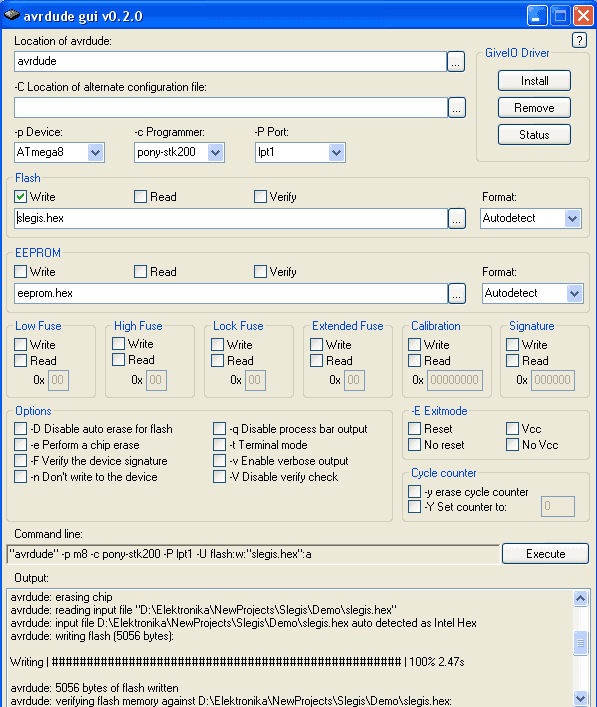
This program has no installation or uninstallation routines. It just has to be in the directory where the avrdude is located. It has almost all functions needed to program AVR microcontrollers effectively. A few things that need to be done are reading fuses and working with single fuse bits. Now you have to define whole fuse bytes what is not very convenient.
In the picture above you see configuration working with AVR ISP programmer connected to LPT1 port.
Again if you are using WINAVR compiler tools, I prefer to program chips using a makefile. Then I can program the AVR microcontroller by pressing a single button. But if you compile programs with other tools like Codevision, Imagecraft, or ASM compiler, AVRDUDE with AVRDUDE-GUI may be helpful.
For available options refer to AVRDUDE documentation.
Hey, I need lil’ help.
I am trying to program atmega32l with avrisp using at90s1200 with SPI. I prepared it as per the following circuit http://www.serasidis.gr/circuits/avr_isp/avr_isp.htm. This same circuit is also given in application notes of at90s1200 provided by atmel.
I tried avrdude-gui, anrprog, ponyprog, avrstudio4; but none of them recognized my device. avrdude-gui is giving the followign error :
avrdude; serial_open():can’t set attributes for device “com1”
Please hel. thanx in advance
hai,
I need C code for LPC2148(ARM7)microcontroller so that I can get display of a map on graphical LCD(128×64. I have bitmap software to design the map.