




Today it is common practice to use various circuit and microcontroller simulators for developing programs. Using simulators, you have several benefits comparing to real prototype boards. You don’t have to connect any hardware to test a piece of code; also, you don’t have to be in the same place when working. You can have simulator software on your Laptop and work where ever you want. Of course, you can see more parameters within the simulator like register values, memory, signals in a convenient form.
So controlling graphical LCD on simulator software like Proteus is an easy task.

Working with the simulator is easier because you don’t have to wary much about additional pins, like MCU power pins, crystals, or other protection circuits. You need to connect control lines and LCD power pins. Define microcontroller Clock frequency in Atmega8 symbol and load program file(.hex) by browsing it in the same component menu. And then you can run the program. The Proteus simulator has KS0108 based 128×64 graphical LCD(LGM12641BS1R), which works as my real GLCD(HQM1286404 ) simulator pins are ordered differently than in the real one.
Fabian Maximilian Thiele’s library also has powerful character control functions. First of all, Just download the GLCDFontCreator2 java program to fetch fonts from the Windows system and generate fonts for graphical LCD.
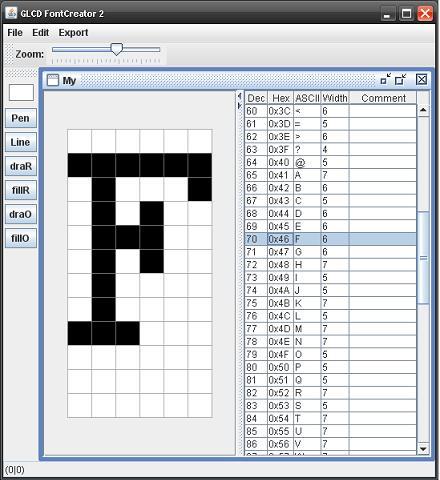
Font creator generates convenient file .h with all font data, which can be read by program functions.
First of all in the program you have to include font file .h or multiple files.
#include “SC.h”
Then you have to select font which will be used currently:
ks0108SelectFont(SC, ks0108ReadFontData, BLACK);
And then you can simply put tech on the LCD screen with simple command:
ks0108Puts(“scienceprog.com”);
Or if you want from flash memory:
ks0108Puts_P(PSTR(“Test Fonts”));
You can also draw various graphic with functions built in library:
//round rectangle
ks0108DrawRoundRect(5, 5, 117, 20, 8, BLACK);
//line
ks0108DrawLine(5, 50, 122, 50, BLACK);
//circle
ks0108DrawCircle(25, 55, 5, BLACK);
And even more.
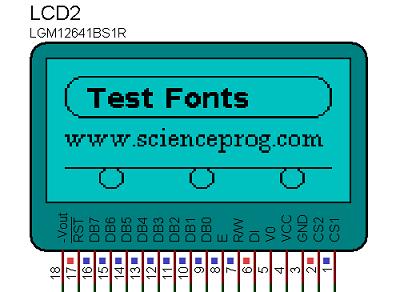
Project files and for the example above and Proteus model you can download here: GLCD example with fonts
It’s a very interesting but i need a code
Link to code is at the end of article
Can you please, suggest us which compiler is used to compile this code?
I Use this example and work very well…. the question is…. can you tell me how to use a fixed width fonts in your example? some think that SystemFont5x7.h. I need this to put formatted text into the glcd. Thanks.
LCD Module @ AORAN-LCD
More many different alphanumeric types ,graphic types, give you plenty to chose from- 1×8 to 4×40 character displays ,122×32 to320x240 Graphic displays. Standard backlight options of low-power electroluminescent, high-brightness EcoBrightTM non-powered backlight by special order. LED or CFL backlights, low profile edge light options for thinner displays.
Standard or wide-temperature (-20°C to +70°C) operation. All parts can include an HD44780 compatible controller which can be ordered in either: Standard, European, Cyrillic, Russian, or Greek font options.
With more than hundreds different combinations in our regular range, we have the display for your application. If we haven’t, we can always fully or semi custom them for you!
thanks you for this fully project
can you tell me .which compiler you used to compile this code?
thanks
I have try this tutorial above,it is work.But i was wondering can you make FontCreator.java then make it hex files? or do you need other tools??
Hi,
¿this code only works on GLCD with Ks0108 controller? Could it work with a GLCD with s6b0107? Because I found that this controller is similar, but when I turn on the GLCD the screen is empty.
Thanks for your answer
thanks
Hi, how do I import the Project to Proteus? Zip archive only contains a Programmer ‘s Notepad Project File and a Schematic Capture File for Proteus.
But I don’t know how I can import the source (and which of the many source and header files) to Proteus?!
Thanks Mo
Moritz, you need to compile source in to .hex and then import it to MCU model in proteus. use ks0108Test.hex from archive.