




Firmware for AduC70xx ARM microcontrollers can be uploaded using a built-in boot-loader. To work with boot-loader, Analog Devices offer a small free program, ARMWSD working under the windows system. The program doesn’t require installation. ARMED communicates with AduC70xx via COM-port. Simple programming steps looks like this:
- Connect target board to PC COM port;
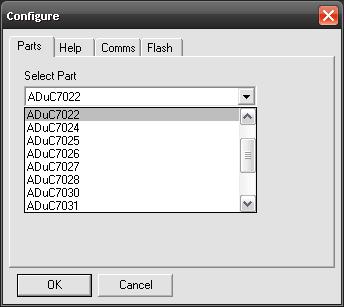
- Go to Configure->Parts and select AduC part:
- Then go to Configure->Comms and select serial port and baud rate:

- Select other settings if needed (Mass erase, Program, Verify, Protect) in Configure->Flash menu;
- Press OK to get to the main window again. Browse for hex file – only hex files are supported in this program. When you are set, then press the Start button – The program starts waiting for boot-loader action:

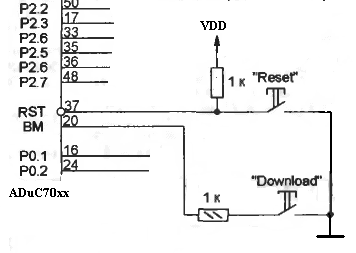
- Now you have to start boot-loader on your target board. As you know, entering boot-loader needs some procedure to be done. Manually you have to press the button “Download” connected to the BM pin, then power on board and rapidly press and release the “Reset” button and then release the “Download” button; after this, AduC70xx enters boot-loading mode and downloads the hex file.
Program is simple but it does the job.
No option given for programming ADUC7060 in the ARMWSD programming tool. I need this tool to program ADUC7060.