




After I implemented interfacing LCD to ATmega8 using 2 wires https://scienceprog.com/interfacing-lcd-to-atmega-using-two-wires/
I decided to make another example but with 3 wires. Using 3 wires makes control much simpler as it is easier to control data flow to shift register. Here I used the same super cheap 74HC164 serial in parallel out register.
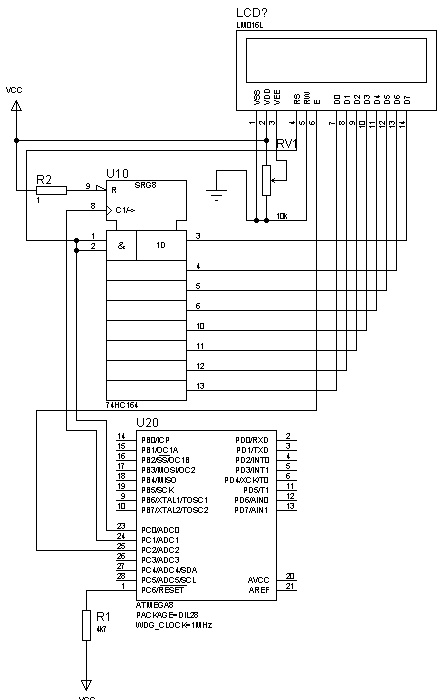
LCD to shift register is connected in 8-bit mode. LCD strobe pin E is controlled with an Atmega PC2 pin. The register is clocked with PC1, and data is transferred with a PC0 pin. Notice that I used the same data line (PC0) to control the LCD RS pin. RS pin is controlled in this way: after 8 bits are sent to shift register, enable data line by setting ‘1’ (PC0) without clocking and after this LCD E pin is strobed. For more details, take a look at my source code at the end of the article.
If there is any questions, don hesitate to ask.
Source code:3 Wire LCD interface to ATMEGA
there are any problem in using 74LS164 instead 74LS164?
tks,
Christiano
There shouldn’t be any problems with that.
What is the value of R2?
In my actual circuit I have used 10k. This may vary I think from 4.7k as it is Pull-Up resistor only.
Which is the value of r2?
Why the lcd only writes a series of squares instead of the word test?
Why you didn’t use SPI on ATMega ?
connect SCK,MOSI to 74*164 inputs, D4..D7 and RS to outputs.
and i.e. SS pin to EN – 3 lines – lcd in 4bit mode 🙂
it’s much easier to program it (IMHO)
Best Regards
Vaitek
Using SPI s a good idea. Maybe I will try to simulate this version. Only one disadvantage of such connection is that hardware is tied to SPI pins instead to any MCU pins. I bet programming should be more easy using SPI.
can just use any LCD or must be the one you are using?
Any standard alphanumeric LCD based on HD44780 controller.
I’m need PB3, PB5, PD5 to connect LCD. Help me.
Why my lcd write UESU! instead of TEST!.I use od-dm1601b,tks.
Do you use standard LCD? Are all connections made properly? Because this circuit should work properly – tested myself.
hey kindly help me
i have atmega 8 and displaytech 16*2 lcd ……i want to display some text when the ir sensor connected to its adc port is interuppted.how to go for it
Hi,
Does the shift register have to be controlled by the adc pins on the atmega or can another port be used?
Thanks
You can use any I/O pins for this. Of course you need to do changes in software definitions.
HOW TO INTERFACE ATMEGA 128 WITH LCD
Can you make a new design to use at graphic lcds? Or can you describe it, i can try it by myself. (like 128×64 dotmatrix).
With graphical LCD there would be more mess as there are additional CS[1..2] control pins. So I would think about at least five wires needed. If this would be practical to do this I don’t know. And of course output speed – shift register would take at least 8 times more clock cycles to output one pixel. For slow applications this is OK, but for time critical – not. In such case it would be better to take additional cheap MCU dedicated to GLCD.
Thanks for sharing this code and schematics. It work really good. This is indispensable for tinny MCUs.
Can u mail me the hex file for atmega32 programming for LCD display
THANKS FOR SHARING ,, THIS IS VERY USEFUL PROJECT WHEN THERE IS SHORTAGE OF PINS ON MICROCONTROLLER