Category Archives: Embedded General

As automobiles become increasingly user-independent and ‘intelligent,’ the demand for embedded electronic devices for use in cars is steadily increasing. This was indicated by increased demand for printed card buses (PCBs) that were destined for use as embedded devices in … Continue reading

Embedded Electronics in Prosthetic Limbs

Advancement in embedded electronics has transformed the way people work, communicate and unwind. It has paved the way for the integration of home and office device networking so people can share, transfer and save data and information in rates that are faster than ever. It has also promoted safety, comfort and efficiency in aviation as well as in land and sea navigation.

Embedded electronics, however, can also improve lifestyle and over-all well-being by providing new and better equipment to help people, especially those who are physically challenged.

The DARPA Revolutionizing Prosthetics Program

Revolutionizing Prosthetics Program is an ambitious effort of the Defense Advanced Research Projects Agency (or DARPA). The main goal of the program is to help rehabilitate members of the armed forces who have been injured in the line of duty. It is a costly project that intends to develop an integrated, life-like prosthetic limb that can be controlled using residual nerves, provide feedback and provide more features that the current prosthetic limbs do not offer.

Continue reading

Embedded Electronics for the Handicapped

Embedded electronic technology is all around. One may live in a digitized house, ride a car or subway train that has embedded sensors and detectors and work using an integrated company network. One can eat lunch in restaurants or play in amusement centers that have integrated computers, screens and controllers.

Embedded electronics technology is not limited to data transfer, sharing and storage. Many health-care related products also utilize embedded electronics to improve the quality of life. More advanced prosthetic limbs with microprocessors are being developed to bring comfort, stability and balance to handicapped but active members of society.

Embedded Human Body Systems

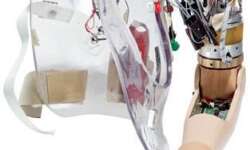
Newer forms of prosthetic limbs are entering the market. Otto Bock Healthcare is the first to develop and sell artificial limbs – the DynamicArm and C-Leg.

Artificial_Arm.jpg


The DynamicArm is the world’s first microprocessor-controlled adaptive arm. Its processor uses a microcontroller to enable communication among sensors, processors and motors. This gives DynamicArm the ability to adapt to various weight loads and conditions. It works by reading nerve actions from the living arm and translating these signals into computerized movement. DynamicArm is strong enough to lift things that are many times its weight.

Continue reading

Embedded Electronics and CTX Imaging

CTX imaging is an image capture process that integrates the traditional techniques of computed tomography (CT) scanners and X-rays. The system is still in prototype stage and is far from small (at present, it’s still as big as one whole room), but Dr. Elizabeth Brainerd of Brown University, who heads the project, hopes that it will become commercial by the first decade of the 21st century.

Problems with Previous Technology

The two origin technologies of CTX imaging, CT scanner and X-ray, each had their own problems with regards to capturing images. CT scans produce high quality images which can be viewed in three dimensions, at the cost of speed; subjects being observed have to stay still for up to an hour. X-rays use a method called fluoroscopy which takes images in quick succession, but at the cost of quality; images produced by x-rays can be pieced together to create a video, but they’re of much lower quality and are limited to two dimensional views.

New Features of CTX Imaging

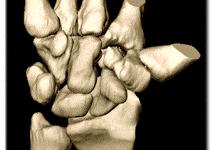
CTX imaging is revolutionary in that it combines the features of CT scanners and X-rays without compromising either capture speed or image quality. Image capture starts with a traditional X-ray of the subject being observed. Then, images from the CT scan will be used to create a detailed three dimensional model of the subject’s bone structure. High speed fluoroscopy, an X-ray technique, is applied from two different angles to capture the subject’s bones in motion. Data from both sets of equipment are then processed by imaging software, which combines them into a fully animated footage of the bones in action, which can be viewed in full 3D. Image capture is fast while great resolution is also achieved.

3D_CTX imaging

(http://brown.edu)

Continue reading

Interfacing microcontrollers to external devices

There can be any external device that may be connected(interfaced) to microcontroller. They may be for control input like buttons, keypads, touch or for information output eg. display, sound, motor, relay, modem. Also output devices may be further chips like transmitters, frequency generators, memory. Interfacing with chips is not that hard because most of all (especially digital ones) are TTL level compliant that allows to connect chips one to another directly. Other wise there are TTL level converter chips if needed – like RS232 to TTL converter MAX232 chip.

Lets take simpel device LED. Probably many of you are thinking that there is nothing more easier that connecting LED to microcontroller. Yes its true. Considering AVR microcontrollers Led can be connected directly to port pin via limiting resistor either as source either as drain because chip is capable to provide enough current to light diode without damaging port. But what if you need to connect like 10 LEDs when each require lets say 20mA. Total current would be 200mA. No tall microcontrollers can provide such power directly without damaging port. Simplest way to avoid this problem is to use LED via amplifying transistor.

transistor_key.JPG

Continue reading

How to describe embedded software design using diagrams and pseudo-code

When designing embedded hardware you probably want to visually express what embedded software will be performing and how different functions depend on each other. How to make software documentation simple clear and informative. If you are developer, you may want to explain your ideas understandably without loads of code text. So depending on what level information has to be provided you may choose any of following.

Data Flow Diagram

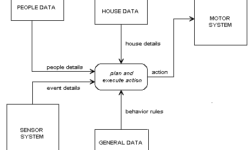
Data flow diagrams are used when you need to see the processes and what data is transferred between different functions. This way each process or function is expressed as block (or any other shape) while lines shows what information passes between processes.

As you can see in example figure simple data flow diagram is presented. Without program code it is easy to read how program operates:

data_flow_diagram.gif


Continue reading

Microwire compared to SPI and I2C

Microwire is a three-wire serial interface used by National Semiconductor in its COPS processor family. The three signals are SI (serial input), SO (serial output), and SK (serial clock). SI and SO are input to and output from the processor, respectively. The processor clocks data to the peripheral on SO and receives data on SI. Data in both directions is captured on the rising clock edge. Peripheral devices that transfer data in only one direction (such as display drivers that are only written, never read) may implement only one data line, SO or SI.

Microwire is older protocol than SPI and it has some differences from it. Original Microwire has fixed fixed clock polarity and clock phase. While SPI can be configured to any clock polarity and phase.

Unlike I2C, the Microwire protocol has no device addressing built into the serial bit stream. Microwire peripherals require a separate chip select input, one per device. This allows data to be transferred more quickly since address information is not needed. It requires more port bits, however, since one chip select, using one port bit, is needed per peripheral. Each Microwire peripheral has a unique protocol based on the application. The number of bits and the meaning of each bit varies. National’s Microwire EEPROMs, for example, have a 4bit command followed by an address (7 to 12 bits, depending on memory size), followed by data (8 or 16 bits). The commands are erase, read, program, enable programming, and so on.

Continue reading

Microcontroller Simulators and emulators

Sometimes you just haven’t ability to flash microcontroller in order to test program functionality in development phase. For this there may be many reasons like you don’t have a prototype ready or you need to test parts of code and so on. For this there are software simulators used which simulates microcontroller work without microcontroller itself. Simulators usually don’t have connection to real world all operations are simulated in software. Microcontroller simulator is a program model which imitates its work. Modern simulators now simulates not only arithmetic operations but also I/O operations and even peripherals like timers, ADC, USART, I2C and so on. In many cases there is possible to prepare whole project jus using simulator and then burn compiled code to real microcontroller.

Simulators usually allow:

  • debugging at source code level;

  • follow operation time in slow motion but with real world values;

  • connect stimulus signals like they are real world signals.

Simulator can be expressed as several blocks interconnected with each other:

simulator_blocks.jpg


This is basic illustration because many moder simulators may have much more blocks.

  • Memory block imitates work of real memory. Microcontroller program has to be loaded to this memory. O course this memory can be split in several modules like Flash, RAM, EEPROM or even External memory;

  • Processor model imitates all operations of real processor like accessing memory contents, doing arithmetic operations, storing results back to memory;

  • I/O model usually reads signals from file where prepared real world signals are stored or it is connected to external circuit model which generates required signals.

Processor model is a core of simulator, because it controls all operations including interrupts. Working with simulator gives many benefits because you can see all parameters just in one window. You can stop processor at any point, change memory contents at any time jus by clicking on screen. But one disadvantage is that simulator is totally isolated from real world. So another option is to use Emulator.

emulator_blocks.jpg


Emulator is much closer to real world conditions, because software is emulated in real hardware while results are seen in special emulator software. In order to emulate target microcontroller special adapteris needed which interacts between host computer and target board. Usually Jtag interface is used to emulate. As a result of using emulator you can precisely emulate microcontroller work even more you don’t need to take care on input signals from sensors as they come from real circuits.


Multiple controllers in one design

Actually many embedded systems use multiple microcontrollers and microprocessors. This is not about a multi-core processors but several distinct processors used in one design.

Multiprocessor systems allow to distribute computing power among different processors and this way overall speed may be increased, coding simplified and modularity reached. Using multiprocessor embedded design have many benefits. One of them is modularity. Imagine situation when a particular microcontroller based subsystem needs to be installed only if a particular optinio is installed. Another as we mentioned is coding simplicity. Instead writing and debugging one complex firmware it may be broken in several distinct much easy manageable functions on different MCU’s.

Using multiple processors may reduce overall cost of design. Imagine if mashine has to handle high speed interrupts with fast response but also it has to handle message level interrupts that occur less often. For one microcontroller system you may choose fast and of course expensive MCU. While two cheaper and slower MCU’s may do same with less horsepower.

Lets take an example of three multiprocessor embedded design:

multiprocessor_system.jpg


System consists of three CPU: CPU1 handles keyboard and display operations; CPU2 is used to communicate between CPU1 and CPU2 and can be connected to other higher level host system. CPU3 controls real time motors and reads sensors. Each CPU have their own Ram and Flash and I/O. Now we can see benefits of such system.

Modularity – CPU2 doesn’t know what type of display (LCD, CRT) is used or what keyboard is used. Control of keyboard and display is performed by CPU1. There can be connected any subsystem with different display types and CPU1. CPU2 only sends/receives messages to/from CPU1. Same situation with CPU3 subsystem. CPU2 don’t care how motor position was detected or it just gets position data from CPU3 and sends commands. CPU3 subsystem may vary (different motor types, different sensors) without major affect to overall system. Messages between CPU’s may be transferred via RS232, Ethernet, direct (SPI, I2C, 1-Wire).

How to decide how manu CPUs are needed? There are three main considerations:

  • Independence and modularity of software;

  • Processor throughput;

  • Physical location.

Talking about independence we can think like one processor can handle a stepper motor and read feedback information from positioning sensor. Keyboard reading and information output to display may be handled by another processor or sometimes may be separate CPUs needed. It depends on complexity of I/O devices. Or even CPU1 could handle CPU2 job. If system has optional configurations it is better to use separate processor for different option.


Debugging embedded hardware and software traces

Usually when designing embedded project we typically focus on actual application, but do not pay enough attention to hardware and software debug process. Adding debugging capability to project require some strategy. Simple situation: hardware may not be installed but connected to other circuit when needed. So software must support the functionality regardless of weather or not hardware installed. Another example may be Embedded board with multiple temperature sensors. Hardware should detect when sensor is connected or disconnected without interrupt of other sensors readings.

One way of debugging is software trace(log) to provide history information what was happening if something went wrong. This technique is good solution for developers who have no ability to use other debugging tools because of following reasons:

  • Bug appears in customer environment where emulators and debuggers cannot be connected, or where emulators would stop critical work. Using debuggers and emulators may disturb normal system work there fore “Live” conditions are lost.

  • Using LOG traces gives another benefit like Macro History. Embedded systems usually control mechanical devices which can have significant lag between error and event that causes an error. Imagine engineer sitting and waiting when error will occur. Emulation is good when error event time is known. According to recorded logs it is easy then to capture an error and analyse;

  • Another reason why software trace may be useful is limited resources. Smaller chips are limited and may not have debugging capabilities;

  • Sometimes emulation may not produce the error because of some hardware problems cased by connected emulator.

  • Lack of physical connections may be another reason why use software trace. In prototyping phase there are usually debugging connections used in board. But when product goes to mass production it may not have debugging connections on it and no emulator can be connected.

  • Las but not least important is that sometimes wee need that software could correlate with outside events such as motor position, sensor output or other signal input.

What debugging information can be recorded? Actually it depends on embedded system designer. But as minimum you may track:

  • Each entry to interrupt routine;

  • Exit from interrupt;

  • Execution of major functions;

  • Each time a message is passed;

Such data is called action codes. They allow to find correlation between software execution and real world events. Action codes may be captured in different ways. One way is to use external hardware where action codes may be sent; another way is to store them in memory for later retrieval.

New on WinAVR Tutorial New on WinARM Tutorial