Category Archives: Electronics Tutorial

Electronics basics.

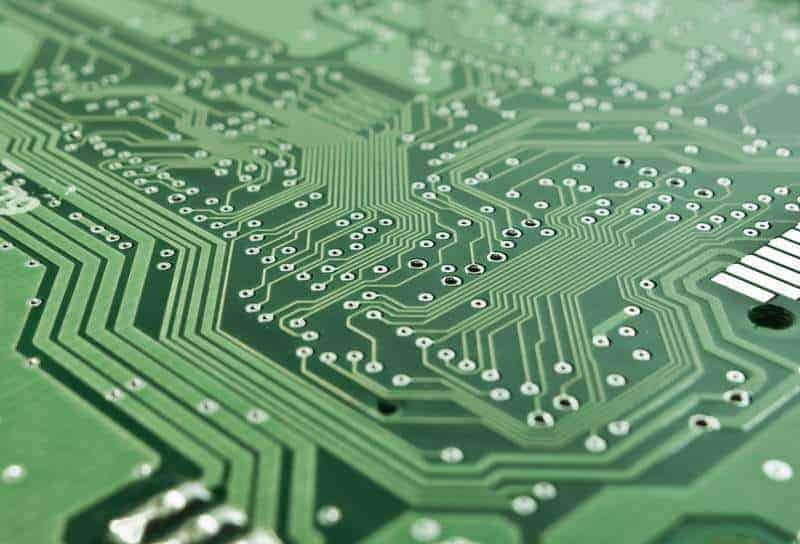
The Easy Ways to Design a Better PCB!

Are you always looking for a better printed circuit board (PCB), but you’re failed to do it in most of time? Well, don’t waste your time anymore for the searching; instead, you can use the precious time to design a better PCB here!

Before that, most of you have learned that PCB fab houses, such as advanced circuits, Batch PCB, PCB123 and other are quite hard job to do with. Hence, it’s not an easy task, as there are many ways for a fab house to mess it up! Moreover, fab houses tend to spend less time on prototypes than on production runs. To overcome the matter, you should try to design PCBs for manufacturability. The main goal of this project is to show you how to minimize the number if ways the fab houses can screw up a PCB!

For avoiding yourself from mess up with the PCBs, you would like to refer to some of the finest DFM (design for manufacture) rules, tricks and tips on how to build a good PCB. And, if you’re trying to create a prototype PCB, then you must use these rules and tips to increase the chances that your prototype will work after you’ve done with it!

Great method of PCB reverse engineering by using a Photoshop

Rriccibitti have sent us his latest work on reverse engineering of simple keypad circuit. The solution seems to be very simple but effective. What he used is a digital camera to take a picture of printed circuit board and a photo editing software where he could track PCB traces with different colors.

OK, for this one he used a Photoshop as it seems to have lots of valuable tools that makes this work much easier. To be more specific lets see what he’s done:

  • Took the same size pictures of both PCB sides with a digital camera;
  • Put both pictures in different layers in picture editing software. Of course one has to be mirrored.
  • Transparentized top side of PCB so the bottom connections and tracks could be seen;
  • With magic wand tool he removed the color of free top area.

After this simple preparation he simply took a bucket fill tool and market different tracks with different colors.

After all this is really great method of analyzing unknown PCB especially if you need to repair some electronic device or even hack it.

Learning From The Electronic Experts!

Do you have a lot of passion in the electronic field or you may even want to major the electronic and make it as your career? If you did, then you must keep read on the rest of the paragraphs!

Did you know there is a site named ‘Electonics.wisc-online‘ that is in cooperation with the Wisconsin Online Resource Center and it’s based upon works supported by the National Science Foundation? Well, it’s a very interesting and interactive electronic and electrical learning site, which it is mainly focusing on concepts that cover a broad range electromechanical program!

If you spend a few couple of hours on it, you’ll probably find out that the majority of these objects have been created for electronics. However, beside the electronic projects, there are at least 300 more objects that being built on other topic, such as the hydraulics, pneumatics, mechanical design etc.

For you information, these objects were mostly created by the experienced instructors from Fox Valley Technical College and other prestige colleges in the Wisconsin Technical College System. The best part about this site is the project was perfectly demonstrated in an evaluation and being conducted at FVTC during the 2004-2005 academic year. The presentation is neat, easy to understand and very awesome indeed!

Come and check it out yourself, who know that you might learn something new today!

Putting your electronics project in an enclosure

Probably projects that are finished and put in an enclosure always catches an eye rather than PCB prototype with multiple wires showing up. Of course project that does its job is fine enough even without nice shell. But what if you don’t want your board to be exposed. Then put your project in a box. From this point you need to be an electronics engineer and designer in one. Probably everyone have their own way of putting projects in the boxes, but there are few tips that can save time and nerves.

Sparkfun has a nice reading about things to keep in mind while looking for box and planning necessary tasks. Lets go through them – some of them are really cool that I didn’t about before:

  • If you have buttons that need to be accessed through the case, find a shallow enclosure or tall buttons.
  • If there is a display you want to read but don’t want a big hole in the lid, look for an enclosure with a clear top.
  • If environmental conditions may be a factor, find an enclosure that is rated for the conditions you expect your product to experience. Take a look at these IP Ratings. Many manufacturers follow the IP rating system for describing enclosures.
  • Maybe your project has lots of switches or external ports, try a box with tall side walls.
    • Another environmental note, if you plan on having buttons or connectors, keep in mind you’ll want those rated for the conditions you are expecting as well (rain, dust etc.).
    • There are some sealed buttons and switches available for outdoor use, try searching your favorite parts supplier, they should have some.

Continue reading

Encoding and modulation of digital signals

We know that digital signals are stored as binary numbers in memory cells. Let’s see how these digital signals can be transferred in other words – how they can be encoded in to electrical signal shape. When signal has to be sent it has to be modulated.

Pulse Code Modulation (PCM)

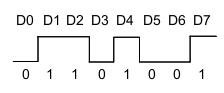
Probably simplest and most common modulation method is pulse code modulation (PCM).

PCM_pulse_code_modulation.JPG

In CPM coding information is modulated as voltage levels. If supply voltage is 5V, then binary”1″ is represented as +5V while 0 as 0V level. Only two voltage levels are used to modulate signal. Signal can be sent in parallel (bus mode) or serial mode. In parallel mode whole (let’s say 8 bit) signal can be sent at once via 8 wires, while in serial mode data has to be sampled in time. This transmission method is most popular in embedded systems, for instance, ADC sends converted data to DSP using CPM. Continue reading

Printed Circuit Board (PCB) Technologies

The term circuit technology usually refers to the various techniques that used in the manufacture of electrical circuits. A large number of devices that are used today make use of printed circuit boards (PCBs). These devices provide a mechanical support for the various components present within the given device and also, the electrical connections between the components.

The electrical connections present on the PCB are made out of copper sheets that are laminated on a non-conducting material. Initially a large copper sheet is laminated on the board and then the sections that are not required are removed. Various techniques are used for removal of unwanted copper. Some of them are:

  • Silk Screen Printing: In this technique, an etching resistant ink is applied on those areas that are required and the remaining part is etched off.
  • Photoengraving: Here a photo mask of the circuit required is prepared using desired software and then, it is applied onto the blank PCB. After this the portions that are not required are etched off.
  • PCB Milling: In this technique, a mechanical milling system that can work on 2 or 3 dimensions is used to remove the copper. The milling system is controlled by software.

Continue reading

Audio Signal Processing

Processing of audio signals is one of the most important and widely used applications of digital signals processing. It is being used in many fields such as communication, broadcasting of audio signals for radios, television etc. It primarily includes analysis of audio signals that fall in the human hearing frequency by mathematical. The audio signals that fall in the human auditory range depends both on physical and psychological factors. A separate branch has been introduced to study the same and is called psychoacoustics.

Wherever signals are concerned, one has to deal with two different types viz. digital and analogue. The techniques that are used in order to deal with these two types of audio signals are different. In case of analogue audio signals, the pressure transformations are usually represented electrically in the form of voltage levels.

Insertion_of_Similar_Sound_Waves.jpg

Continue reading

Connection sockets and headers used in embedded projects

Probably everybody gets confused each time when considering what connectors to use in electronic projects. There are so many connector types and technologies that can be chosen. So what connectors is the best choice, or there is no single answer? Before answer these questions lets go through several points. First of all why do we need connectors? There is no problem to solder all components and wires together without ability to loosen or wear out. But in fact there are much more advantages of using connectors comparing to reliability of connection.

  • Connectors make it easier to assemble electronics products;
  • Allows easier to repair devices with ability quickly to replace faulty parts;
  • Easier to upgrade old components or blocks with newer ones;
  • Ads flexibility to design.

Probably most common connector used by embedded electronics hobbyists are 0.100″ spaced pins as its step is same as of widely used DIP chips and prototyping breadboards.

2_54_header_connectors.jpg

Continue reading

Batteries and cell characteristics

Batteries are cheap, small and relatively safe way of having portable energy source. There are many types of batteries with different characteristics and uses. Probably many of you heard terms battery and cell referring to the same. But from technical perspective these are different things – cell is a single unit which houses a single chemical reaction and produces electricity, while battery is a pack of cells.

Nominal cell voltage and battery voltage

For instance single AA battery can be called a cell because this is a single unit where single chemical reaction generates voltage of 1.5V, but car lead-acid battery have six cells producing 2.0V each while all battery produces 12V. So first important thing to remember that single cell can produce specific nominal cell voltage that depends on chemical reaction, while battery voltage is a combined voltage of multiple cells connected in series (or parallel). Continue reading

Bi-color LED indication

Bi-color LEDs are same LEDs as uni-color just there are more than one LED housed in one package. Bi-color LEDs may have two or three leads depending on intentional connection method.

Three lead LEDs have common cathode lead to which both LEDs are connected internally.

 led_multi_color_5mm_bi_color_tech.jpg

In order to tun one of the LEDs or both at the same time connect cathode to ground via current limiting resistor which value is equal to one LED required limiting. Of course you can connect current limiting resistors to each of anodes and control current individually. Then you can apply power to one of anodes or both at same time to have bi-color amber illumination.

Two leads bi-color LEDs have two LEDs connected in parallel but in opposite sides. One LEDs anode is connected o another LEDS cathode and other lead same way. So by applying power you will be able to light only one LED. For instance if you connect to microcontroller you will need to use two microcontroller pins to control both LEDs.

bicolor_two_lead.PNG


So you cant turn on both LEDs at once without specific technique like dynamic switching both LEDs in high speed that would make effect of both LEDs lighted on.

bicolor_via_inverter.PNG


If your design have limited number of pins for controlling bi-color LEDS, you can use an inverter chip and this way reduce pin number to one and have ability to control both LEDs like shown above..

New on WinAVR Tutorial New on WinARM Tutorial