Archive for the 'AVR Microcontrollers' Category

Build Piconomic Atmega128 development board by yourself

Thursday, October 26th, 2006

Earlier I have written about Piconomic learning course and its nice development board they provide. You can purchase the board if you are from a South Africa internationally for $49.99 + $9.37 airmail shipping with a tracking number, which takes 2-4 weeks, depending on custom delays. Of course there is good opportunity to build this [...]

Generate sine wave modulated PWM with AVR microcontroller

Tuesday, October 17th, 2006

This example will show how ease can sinewave modulated PWM modulated using AVR microcontroller and few lines of code. For this example I used Atmega8 MCU. All project is set up in VMLAB simulator.
To achieve this I saved sinewave lookup table in a Program memory (don’t forget to include interrupt.h header file):

const uint8_t sinewave[] [...]

Two AVR-GCC examples of using AVR 8 bit Timers

Friday, October 13th, 2006

Timers are very important part of microcontrollers. They can can be used in many areas starting with simple timed routines to RTOS. Good thing is that timers run independently to main program flow. Set up the timer counter and let it do its job while your main program runs and does its job.
Lets take AVR [...]

Learning kit with multiple microcontroller support

Thursday, October 12th, 2006

For those who don’t like to mess up with PCB making and prototyping but want to learn to program multiple types of microcontrollers there is a solution. Team in India developed easy to use kit for learning microcontrollers.

Kit includes:

Ease and simple to use E- tutorial and printed version book;

Tutorial screen-shot

Programmer that supports all kit microcontrllers: [...]

Simple TTL to RS232 adapter

Wednesday, October 11th, 2006

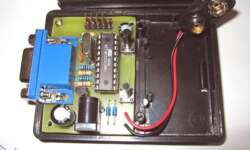
During spare time I made quick design of TTL to RS232 adapter, that works with my AVR development board. This adapter helps to connect TTL (Transistor-Transistor Logic) level signals to RS232 interface. TTL side is 9-pin female connector and RS232 sire is male connector.
Unit is powered from target board using power pins.
The RS232 TTL adapter [...]

Simplest dor-bell based on AVR microcontroller

Tuesday, October 10th, 2006

This circuit is so simple and generated sound may look ugly, but from other hand this is good starting point for newbies with AVR projects. This circuit is made of one IC AT90S2313 (may be substituted by Attiny2313). Circuit is low power and reliable as it consists of very few parts (if SMD chip used, [...]

ATMEL AVR ISP programmer that works with AVRStudio4

Monday, October 9th, 2006

Probably many of AVR software developers that use AVRStudio4 environment would like to program chips directly from AVRStudio4 using AVRISP. Usually we use simplified version of AVRISP that work with PonyProg or AVRDUDE. But here is solution, that can solve this problem.
In sixca.com is populated simplified version of AVR ISP programmer that works with ATMEL [...]

AVR serial and parallel High-Voltage programmer

Monday, October 9th, 2006

This programmer isn’t widely popular as usually is easier to use ISP programming method. But sometimes if you need to disable RESET pin and use it as regular pin instead or you want to disable or restore SPI fuses who control ISP programming method, then you will need High-Voltage parallel programmer of AVR microcontrollers.
One of [...]

avrdude-gui another easy way to program AVR microcontrollers

Thursday, October 5th, 2006

Avrdude-gui is a simple graphical user interface(GUI) for avrdude which is a command line tool running on several OS to program the Atmel AVR Microcontrollers. AVRDUDE-GUI is included in WinAVR toollset and can be used separately to program AVR chips avoiding command line as it has to be done with plain AVRDUDE.

This program has [...]

Convenient AVR ATMEGA board with multiple MCU support

Tuesday, October 3rd, 2006

The board is very neat and convenient to use. If you’re just starting to learn prototyping AVR microcontrollers this is just what you might need.

If you use DIP socket instead soldering AVR microcontroller directly, then you can interchange following AVR’s: ATMEGA16(L), ATMEGA163(L), ATMEGA32(L), ATMEGA332(L), AT90S8535(L) – well some of them are obsolete models. [...]